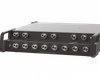
Electro Standards Laboratories 16-Channel RJ45/CAT5e AB Switch, Telnet/GUI Model 7318

Description
FEATURES: Each channel allows access to two RJ45 CAT5e compliant networks from one COMMON port. All (8) pins of the RJ45 interface are switched via break-before-make electromechanical relays. All 16 channels switch simultaneously. Eliminates the need to plug and unplug cables. The switch ports are transparent to all data. Cat5e compliance. Front-panel pushbutton control. Front panel LED's display switch position, lockout, Gang Mode, and power status. Remote Control of the switch from a 10/100 Base-T LAN Ethernet environment. IP Addressable! Remote Control Telnet Command Interface or Graphical User Interface that allows the user to control switch position, lockout front panel operations, change the Gang Mode, as well as obtain switch status and receive Gang Status updates. Gang Operation allows all connected units in the Gang Mode to stay synchronized in the same position and lockout state. Switch maintains last set position on power loss and continues to pass data. Gang operation of multiple units to simultaneously control 32 channels, 48 channels, 64 channels, ... etc! Attractive all metal black box packaging provides EMI/RFI shielding. Custom length RJ45 CAT5e cables available for your installation. The unit can be configured via its Ethernet port over a LAN connection. If a LAN connection is not available, using the OPTIONAL Ethernet crossover cable (ESL P/N 984228-006), the unit can be configured by direct connection to the Ethernet port of a computer. Ethernet Remote port, IP Addressable, with GUI UTILIZING THE USER FRIENDLY REMOTE GRAPHICAL USER INTERFACE SOFTWARE. To connect to the switch from a workstation or computer having access to the LAN that the switch's LAN port is connected to, simply launch a standard web browser and type in the appropriate IP address. The Java Applet will be automatically uploaded from the switch upon connection. The environment requirement for the GUI is Java 1.7 and above.
Datasheet
Description
FEATURES: Each channel allows access to two RJ45 CAT5e compliant networks from one COMMON port. All (8) pins of the RJ45 interface are switched via break-before-make electromechanical relays. All 16 channels switch simultaneously. Eliminates the need to plug and unplug cables. The switch ports are transparent to all data. Cat5e compliance. Front-panel pushbutton control. Front panel LED's display switch position, lockout, Gang Mode, and power status. Remote Control of the switch from a 10/100 Base-T LAN Ethernet environment. IP Addressable! Remote Control Telnet Command Interface or Graphical User Interface that allows the user to control switch position, lockout front panel operations, change the Gang Mode, as well as obtain switch status and receive Gang Status updates. Gang Operation allows all connected units in the Gang Mode to stay synchronized in the same position and lockout state. Switch maintains last set position on power loss and continues to pass data. Gang operation of multiple units to simultaneously control 32 channels, 48 channels, 64 channels, ... etc! Attractive all metal black box packaging provides EMI/RFI shielding. Custom length RJ45 CAT5e cables available for your installation. The unit can be configured via its Ethernet port over a LAN connection. If a LAN connection is not available, using the OPTIONAL Ethernet crossover cable (ESL P/N 984228-006), the unit can be configured by direct connection to the Ethernet port of a computer. Ethernet Remote port, IP Addressable, with GUI UTILIZING THE USER FRIENDLY REMOTE GRAPHICAL USER INTERFACE SOFTWARE. To connect to the switch from a workstation or computer having access to the LAN that the switch's LAN port is connected to, simply launch a standard web browser and type in the appropriate IP address. The Java Applet will be automatically uploaded from the switch upon connection. The environment requirement for the GUI is Java 1.7 and above.
Datasheet

Suppliers

Company
Product
Description
Supplier Links
16-Channel RJ45/CAT5e AB Switch, Telnet/GUI - Model 7318 - Electro Standards Laboratories
Cranston, RI, USA
16-Channel RJ45/CAT5e AB Switch, Telnet/GUI
Model 7318
16-Channel RJ45/CAT5e AB Switch, Telnet/GUI Model 7318
FEATURES: Each channel allows access to two RJ45 CAT5e compliant networks from one COMMON port. All (8) pins of the RJ45 interface are switched via break-before-make electromechanical relays. All 16 channels switch simultaneously. Eliminates the need to plug and unplug cables. The switch ports are transparent to all data. Cat5e compliance. Front-panel pushbutton control. Front panel LED's display switch position, lockout, Gang Mode, and power status. Remote Control of the switch from a 10/100 Base-T LAN Ethernet environment. IP Addressable! Remote Control Telnet Command Interface or Graphical User Interface that allows the user to control switch position, lockout front panel operations, change the Gang Mode, as well as obtain switch status and receive Gang Status updates. Gang Operation allows all connected units in the Gang Mode to stay synchronized in the same position and lockout state. Switch maintains last set position on power loss and continues to pass data. Gang operation of multiple units to simultaneously control 32 channels, 48 channels, 64 channels, ... etc! Attractive all metal black box packaging provides EMI/RFI shielding. Custom length RJ45 CAT5e cables available for your installation. The unit can be configured via its Ethernet port over a LAN connection. If a LAN connection is not available, using the OPTIONAL Ethernet crossover cable (ESL P/N 984228-006), the unit can be configured by direct connection to the Ethernet port of a computer. Ethernet Remote port, IP Addressable, with GUI UTILIZING THE USER FRIENDLY REMOTE GRAPHICAL USER INTERFACE SOFTWARE. To connect to the switch from a workstation or computer having access to the LAN that the switch's LAN port is connected to, simply launch a standard web browser and type in the appropriate IP address. The Java Applet will be automatically uploaded from the switch upon connection. The environment requirement for the GUI is Java 1.7 and above.

FEATURES:

  • Each channel allows access to two RJ45 CAT5e compliant networks from one COMMON port.
  • All (8) pins of the RJ45 interface are switched via break-before-make electromechanical relays.
  • All 16 channels switch simultaneously.
  • Eliminates the need to plug and unplug cables.
  • The switch ports are transparent to all data.
  • Cat5e compliance.
  • Front-panel pushbutton control.
  • Front panel LED's display switch position, lockout, Gang Mode, and power status.
  • Remote Control of the switch from a 10/100 Base-T LAN Ethernet environment.
  • IP Addressable!
  • Remote Control Telnet Command Interface or Graphical User Interface that allows the user to control switch position, lockout front panel operations, change the Gang Mode, as well as obtain switch status and receive Gang Status updates.
  • Gang Operation allows all connected units in the Gang Mode to stay synchronized in the same position and lockout state.
  • Switch maintains last set position on power loss and continues to pass data.
  • Gang operation of multiple units to simultaneously control 32 channels, 48 channels, 64 channels, ... etc!
  • Attractive all metal black box packaging provides EMI/RFI shielding.
  • Custom length RJ45 CAT5e cables available for your installation.
  • The unit can be configured via its Ethernet port over a LAN connection. If a LAN connection is not available, using the OPTIONAL Ethernet crossover cable (ESL P/N 984228-006), the unit can be configured by direct connection to the Ethernet port of a computer.

Ethernet Remote port, IP Addressable, with GUI
UTILIZING THE USER FRIENDLY REMOTE GRAPHICAL USER INTERFACE SOFTWARE.
To connect to the switch from a workstation or computer having access to the LAN that the switch's LAN port is connected to, simply launch a standard web browser and type in the appropriate IP address. The Java Applet will be automatically uploaded from the switch upon connection. The environment requirement for the GUI is Java 1.7 and above.

Supplier's Site Datasheet

Technical Specifications

  Electro Standards Laboratories
Product Category Network Equipment
Product Number Model 7318
Product Name 16-Channel RJ45/CAT5e AB Switch, Telnet/GUI
Network Equipment Switch
Area Network Type LAN Capable
Form Factor Rack Mount
Unlock Full Specs
to access all available technical data

Similar Products

Modem - 35720132 - Radwell International
Dataforth Corporation
Specs
Network Equipment Modem
View Details
CANpro USB embedded -  - Softing Inc. Industrial Automation
Softing Inc. Industrial Automation
Specs
Network Equipment Modem
View Details
Network Switches - 2727677 - RS Components, Ltd.
RS Components, Ltd.
Specs
Network Equipment Switch
Number of Ports 8 #
View Details
PROFIBUS-DP - profibus dp - BARTEC
Specs
Network Equipment Repeater
View Details