Visual Sound, Inc. Digital Class 15" LCD Writing Monitor -- Easiest Tool for Annotating, Electronic Whiteboarding, Touch Screen Control and Recording Voice & Notes DC-502

Description
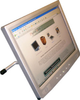
Alliance International It's the ease of use of Digital Class software which clearly distinguishes Digital Class from any other LCD writing tablet. Digital Class™ is the one electromagnetic LCD monitor that can be used for a... It's the ease of use of Digital Class software which clearly distinguishes Digital Class from any other LCD writing tablet. Digital Class™ is the one electromagnetic LCD monitor that can be used for annotation over any PC image or program, electronic whiteboarding, or as a touch screen monitor for integrated control systems. The software even records your voice and your notes, and the file size is not too big. And now, it's more affordable, with new Education Pricing of only $1,995 through our authorized dealers. The DC-502 incorporates a crystal clear 15" electromagnetic LCD screen that allows you to control your computer with an electronic pen. With the pen you can touch the LCD screen to launch and control applications, capture images from any computer program, annotate, save and retrieve your work. You can even annotate of moving video images. Use Digital Class with a projector as an electronic whiteboard for writing and saving notes. The software can even record and playback your voice and pen strokes. Digital Class is an easy-to-use alternative for many electronic whiteboard applications. It is suitable for lecterns, classrooms and executive meeting room table tops. The difference is in the software. Digital Class uses a one-line tool bar with all the tools you need for your presentation. The software is designed with executives and professors in mind ... so they can concentrate on their presentation and not the equipment. Absolutely, positively the easiest to use presentation software/tools of any LCD writing monitor. Software is especially well suited for business executives, professors and teachers -- it's easy enough for the rest of us! Visit our website to see an on line demo, and to take a tour of the tool bar. All lines drawn are very, very smooth, and the pen is pressure sensitive. The harder you push, the thicker the lines.It's like writing on paper, or using a real highlighter. Records your voice & your notes, and the file size is not too big (smaller file size makes files easier to share and download over the internet). Post lessons/files to the internet. Users include Johnson & Johnson, Volvo Truck, General Dynamics, Anheuser Busch, Coca Cola, Emory, U. of CA, College of William & Mary, Hampton U, U of Dayton, National Institutes of Health, US Navy and others. Optional USB document camera, and optional flush mount available for use in a lectern, or check out our own Digital Class Lectern, the DC-LC1. Special education price of $1,995 available.
Description
Alliance International It's the ease of use of Digital Class software which clearly distinguishes Digital Class from any other LCD writing tablet. Digital Class™ is the one electromagnetic LCD monitor that can be used for a... It's the ease of use of Digital Class software which clearly distinguishes Digital Class from any other LCD writing tablet. Digital Class™ is the one electromagnetic LCD monitor that can be used for annotation over any PC image or program, electronic whiteboarding, or as a touch screen monitor for integrated control systems. The software even records your voice and your notes, and the file size is not too big. And now, it's more affordable, with new Education Pricing of only $1,995 through our authorized dealers. The DC-502 incorporates a crystal clear 15" electromagnetic LCD screen that allows you to control your computer with an electronic pen. With the pen you can touch the LCD screen to launch and control applications, capture images from any computer program, annotate, save and retrieve your work. You can even annotate of moving video images. Use Digital Class with a projector as an electronic whiteboard for writing and saving notes. The software can even record and playback your voice and pen strokes. Digital Class is an easy-to-use alternative for many electronic whiteboard applications. It is suitable for lecterns, classrooms and executive meeting room table tops. The difference is in the software. Digital Class uses a one-line tool bar with all the tools you need for your presentation. The software is designed with executives and professors in mind ... so they can concentrate on their presentation and not the equipment. Absolutely, positively the easiest to use presentation software/tools of any LCD writing monitor. Software is especially well suited for business executives, professors and teachers -- it's easy enough for the rest of us! Visit our website to see an on line demo, and to take a tour of the tool bar. All lines drawn are very, very smooth, and the pen is pressure sensitive. The harder you push, the thicker the lines.It's like writing on paper, or using a real highlighter. Records your voice & your notes, and the file size is not too big (smaller file size makes files easier to share and download over the internet). Post lessons/files to the internet. Users include Johnson & Johnson, Volvo Truck, General Dynamics, Anheuser Busch, Coca Cola, Emory, U. of CA, College of William & Mary, Hampton U, U of Dayton, National Institutes of Health, US Navy and others. Optional USB document camera, and optional flush mount available for use in a lectern, or check out our own Digital Class Lectern, the DC-LC1. Special education price of $1,995 available.

Suppliers

Company
Product
Description
Supplier Links
Digital Class 15
Broomall, PA, USA
Digital Class 15" LCD Writing Monitor -- Easiest Tool for Annotating, Electronic Whiteboarding, Touch Screen Control and Recording Voice & Notes
DC-502
Digital Class 15" LCD Writing Monitor -- Easiest Tool for Annotating, Electronic Whiteboarding, Touch Screen Control and Recording Voice & Notes DC-502
Alliance International It's the ease of use of Digital Class software which clearly distinguishes Digital Class from any other LCD writing tablet. Digital Class™ is the one electromagnetic LCD monitor that can be used for a... It's the ease of use of Digital Class software which clearly distinguishes Digital Class from any other LCD writing tablet. Digital Class™ is the one electromagnetic LCD monitor that can be used for annotation over any PC image or program, electronic whiteboarding, or as a touch screen monitor for integrated control systems. The software even records your voice and your notes, and the file size is not too big. And now, it's more affordable, with new Education Pricing of only $1,995 through our authorized dealers. The DC-502 incorporates a crystal clear 15" electromagnetic LCD screen that allows you to control your computer with an electronic pen. With the pen you can touch the LCD screen to launch and control applications, capture images from any computer program, annotate, save and retrieve your work. You can even annotate of moving video images. Use Digital Class with a projector as an electronic whiteboard for writing and saving notes. The software can even record and playback your voice and pen strokes. Digital Class is an easy-to-use alternative for many electronic whiteboard applications. It is suitable for lecterns, classrooms and executive meeting room table tops. The difference is in the software. Digital Class uses a one-line tool bar with all the tools you need for your presentation. The software is designed with executives and professors in mind ... so they can concentrate on their presentation and not the equipment. Absolutely, positively the easiest to use presentation software/tools of any LCD writing monitor. Software is especially well suited for business executives, professors and teachers -- it's easy enough for the rest of us! Visit our website to see an on line demo, and to take a tour of the tool bar. All lines drawn are very, very smooth, and the pen is pressure sensitive. The harder you push, the thicker the lines.It's like writing on paper, or using a real highlighter. Records your voice & your notes, and the file size is not too big (smaller file size makes files easier to share and download over the internet). Post lessons/files to the internet. Users include Johnson & Johnson, Volvo Truck, General Dynamics, Anheuser Busch, Coca Cola, Emory, U. of CA, College of William & Mary, Hampton U, U of Dayton, National Institutes of Health, US Navy and others. Optional USB document camera, and optional flush mount available for use in a lectern, or check out our own Digital Class Lectern, the DC-LC1. Special education price of $1,995 available.

Alliance International

It's the ease of use of Digital Class software which clearly distinguishes Digital Class from any other LCD writing tablet. Digital Class™ is the one electromagnetic LCD monitor that can be used for a...

It's the ease of use of Digital Class software which clearly distinguishes Digital Class from any other LCD writing tablet. Digital Class™ is the one electromagnetic LCD monitor that can be used for annotation over any PC image or program, electronic whiteboarding, or as a touch screen monitor for integrated control systems. The software even records your voice and your notes, and the file size is not too big. And now, it's more affordable, with new Education Pricing of only $1,995 through our authorized dealers. The DC-502 incorporates a crystal clear 15" electromagnetic LCD screen that allows you to control your computer with an electronic pen. With the pen you can touch the LCD screen to launch and control applications, capture images from any computer program, annotate, save and retrieve your work. You can even annotate of moving video images. Use Digital Class with a projector as an electronic whiteboard for writing and saving notes. The software can even record and playback your voice and pen strokes. Digital Class is an easy-to-use alternative for many electronic whiteboard applications. It is suitable for lecterns, classrooms and executive meeting room table tops. The difference is in the software. Digital Class uses a one-line tool bar with all the tools you need for your presentation. The software is designed with executives and professors in mind ... so they can concentrate on their presentation and not the equipment.

  • Absolutely, positively the easiest to use presentation software/tools of any LCD writing monitor. Software is especially well suited for business executives, professors and teachers -- it's easy enough for the rest of us!
  • Visit our website to see an on line demo, and to take a tour of the tool bar. All lines drawn are very, very smooth, and the pen is pressure sensitive. The harder you push, the thicker the lines.It's like writing on paper, or using a real highlighter.
  • Records your voice & your notes, and the file size is not too big (smaller file size makes files easier to share and download over the internet). Post lessons/files to the internet.
  • Users include Johnson & Johnson, Volvo Truck, General Dynamics, Anheuser Busch, Coca Cola, Emory, U. of CA, College of William & Mary, Hampton U, U of Dayton, National Institutes of Health, US Navy and others.
  • Optional USB document camera, and optional flush mount available for use in a lectern, or check out our own Digital Class Lectern, the DC-LC1. Special education price of $1,995 available.
Supplier's Site

Technical Specifications

  Visual Sound, Inc.
Product Category Video Displays
Product Number DC-502
Product Name Digital Class 15" LCD Writing Monitor -- Easiest Tool for Annotating, Electronic Whiteboarding, Touch Screen Control and Recording Voice & Notes
Monitor Type LCD Display
Unlock Full Specs
to access all available technical data

Similar Products

Tacton TN101 OnLogic Industrial Display - TN101R - OnLogic Inc.
Specs
Input Voltage Type Uses DC Voltage
Input Voltage 24 volts
Mounting VESA Mount
View Details
LCD Colour Displays - 2543618 - RS Components, Ltd.
Specs
Monitor Type LCD Display; LED Display
Color Color
Input Types RGB; RGB
View Details
3M Touch Systems
Specs
Monitor Type LCD Display
Input Types DVI; Serial Interface; VGA
Screen Resolution SXGA (1280 x 1024)
View Details