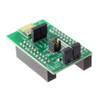
Infineon Technologies AG Evaluation Boards CYBT-263065-EVAL

Description
AIROC™ CYW20820 Bluetooth® & Bluetooth® LE Module Evaluation Kit (CYBT-263065-EVAL) The Infineon AIROC™ CYBT-263065-EVAL Bluetooth® & Bluetooth® LE 5.4 Module Evaluation Kit enables evaluation, prototyping, and development of a wide array of IoT applications using the AIROC™ CYBT-263065-02 module. The AIROC™ CYBT-263065-02 Bluetooth® Module is globally certified, and has an external antenna interface with a -u.FL connector, rapidly reducing the time-to-market. The Infineon AIROC™ CYBT-263065-EVAL Evaluation Kit is supported in the AIROC™ Bluetooth® SDK v3.2 or later within ModusToolbox™ Software and Tools with many code examples for various use cases. To learn more about ModusToolbox™ and download the latest version of the Bluetooth® SDK, please visit the Bluetooth® SDK community page. Kit Features AIROC™ CYBT-263065-EVAL Bluetooth® & Bluetooth® LE Module Evaluation Kit features: An evaluation board that can support various Bluetooth protocols including Generic Access Profile (GAP) Generic Attribute Profile (GATT) Security Manager Protocol (SMP) Radio Frequency Communication protocol (RFCOMM) Service Discovery Protocol (SDP) BLE Mesh protocol Eval board with integrated serial flash Input/output interfaces for communications and programming Various sensors - light sensor, thermistor and LEDs External headers for debugging and connectivity Interfaces to USB power or to a coin cell PCB Antenna and PA/LNA 24MHz crystal oscillator Kit Contents 1 X Module Arduino Evaluation Board (CYBT-263065-EVAL) with on-board AIROC™ Module (CYBT-263065-02) 1 X USB Cable for USB – UART programming Convenient user buttons Bluetooth and Bluetooth module To use the CYBT-263065-EVAL Figure 2: CYBT-263065-EVAL Bottom View 1) Configure the evaluation board headers/switches to the desired settings. 2) Connect the evaluation board to a PC via a USB cable. 3) Open ModusToolbox, and develop, program, and test your application. Note: Recover the CYBT-263065-EVAL board before programming. The Arduino-compatible headers (J3/J4/J6/J7) are optional connections, which provide additional I/O connections to the module and allow for other Arduino shields to be used during development. SW1: Reset switch routed to the XRES connection on the module. SW2: Recover switch routed to the UART_CTS connection on the module. SW3: User-defined switch routed to the P0 connection on the module via J9. SW4: Switch connecting HCI UART connections on the module to the host via USB. SW5: Switch connecting PUART connections on the module to the host via USB. J1: Connection for an external interface for direct HCI UART communication. J2: Used for module power supply current measurement. J3/J4/J6/J7: Arduino-compatible headers used with an Arduino-compatible shield. J8: Configures the VDD voltage input to the module as shown in the following table: J8 Jumper Configuration VDD Voltage Level Short 1 & 2 3.0V Open 1.8V J8 Jumper Configuration VDD Voltage Level J9: Connects the P0 pad on the module to SW3. J10: Connects the P26 pad on the module to LED D1. J11: Module power supply selection from LDO or external connector. The EZ-BT CYBT-263065-02 Module supports Bluetooth SIG Mesh, is qualified for the Bluetooth 5.4 speci¬fication and is certifi¬ed for the 2.4-GHz unlicensed frequency range in USA (FCC), Canada (ISED), Europe (CE), and Japan (MIC).
Request a Quote Datasheet
Description
AIROC™ CYW20820 Bluetooth® & Bluetooth® LE Module Evaluation Kit (CYBT-263065-EVAL) The Infineon AIROC™ CYBT-263065-EVAL Bluetooth® & Bluetooth® LE 5.4 Module Evaluation Kit enables evaluation, prototyping, and development of a wide array of IoT applications using the AIROC™ CYBT-263065-02 module. The AIROC™ CYBT-263065-02 Bluetooth® Module is globally certified, and has an external antenna interface with a -u.FL connector, rapidly reducing the time-to-market. The Infineon AIROC™ CYBT-263065-EVAL Evaluation Kit is supported in the AIROC™ Bluetooth® SDK v3.2 or later within ModusToolbox™ Software and Tools with many code examples for various use cases. To learn more about ModusToolbox™ and download the latest version of the Bluetooth® SDK, please visit the Bluetooth® SDK community page. Kit Features AIROC™ CYBT-263065-EVAL Bluetooth® & Bluetooth® LE Module Evaluation Kit features: An evaluation board that can support various Bluetooth protocols including Generic Access Profile (GAP) Generic Attribute Profile (GATT) Security Manager Protocol (SMP) Radio Frequency Communication protocol (RFCOMM) Service Discovery Protocol (SDP) BLE Mesh protocol Eval board with integrated serial flash Input/output interfaces for communications and programming Various sensors - light sensor, thermistor and LEDs External headers for debugging and connectivity Interfaces to USB power or to a coin cell PCB Antenna and PA/LNA 24MHz crystal oscillator Kit Contents 1 X Module Arduino Evaluation Board (CYBT-263065-EVAL) with on-board AIROC™ Module (CYBT-263065-02) 1 X USB Cable for USB – UART programming Convenient user buttons Bluetooth and Bluetooth module To use the CYBT-263065-EVAL Figure 2: CYBT-263065-EVAL Bottom View 1) Configure the evaluation board headers/switches to the desired settings. 2) Connect the evaluation board to a PC via a USB cable. 3) Open ModusToolbox, and develop, program, and test your application. Note: Recover the CYBT-263065-EVAL board before programming. The Arduino-compatible headers (J3/J4/J6/J7) are optional connections, which provide additional I/O connections to the module and allow for other Arduino shields to be used during development. SW1: Reset switch routed to the XRES connection on the module. SW2: Recover switch routed to the UART_CTS connection on the module. SW3: User-defined switch routed to the P0 connection on the module via J9. SW4: Switch connecting HCI UART connections on the module to the host via USB. SW5: Switch connecting PUART connections on the module to the host via USB. J1: Connection for an external interface for direct HCI UART communication. J2: Used for module power supply current measurement. J3/J4/J6/J7: Arduino-compatible headers used with an Arduino-compatible shield. J8: Configures the VDD voltage input to the module as shown in the following table: J8 Jumper Configuration VDD Voltage Level Short 1 & 2 3.0V Open 1.8V J8 Jumper Configuration VDD Voltage Level J9: Connects the P0 pad on the module to SW3. J10: Connects the P26 pad on the module to LED D1. J11: Module power supply selection from LDO or external connector. The EZ-BT CYBT-263065-02 Module supports Bluetooth SIG Mesh, is qualified for the Bluetooth 5.4 speci¬fication and is certifi¬ed for the 2.4-GHz unlicensed frequency range in USA (FCC), Canada (ISED), Europe (CE), and Japan (MIC).
Request a Quote Datasheet

Suppliers

Company
Product
Description
Supplier Links
Evaluation Boards - CYBT-263065-EVAL - Infineon Technologies AG
Neubiberg, Germany
Evaluation Boards
CYBT-263065-EVAL
Evaluation Boards CYBT-263065-EVAL
AIROC™ CYW20820 Bluetooth® & Bluetooth® LE Module Evaluation Kit (CYBT-263065-EVAL) The Infineon AIROC™ CYBT-263065-EVAL Bluetooth® & Bluetooth® LE 5.4 Module Evaluation Kit enables evaluation, prototyping, and development of a wide array of IoT applications using the AIROC™ CYBT-263065-02 module. The AIROC™ CYBT-263065-02 Bluetooth® Module is globally certified, and has an external antenna interface with a -u.FL connector, rapidly reducing the time-to-market. The Infineon AIROC™ CYBT-263065-EVAL Evaluation Kit is supported in the AIROC™ Bluetooth® SDK v3.2 or later within ModusToolbox™ Software and Tools with many code examples for various use cases. To learn more about ModusToolbox™ and download the latest version of the Bluetooth® SDK, please visit the Bluetooth® SDK community page. Kit Features AIROC™ CYBT-263065-EVAL Bluetooth® & Bluetooth® LE Module Evaluation Kit features: An evaluation board that can support various Bluetooth protocols including Generic Access Profile (GAP) Generic Attribute Profile (GATT) Security Manager Protocol (SMP) Radio Frequency Communication protocol (RFCOMM) Service Discovery Protocol (SDP) BLE Mesh protocol Eval board with integrated serial flash Input/output interfaces for communications and programming Various sensors - light sensor, thermistor and LEDs External headers for debugging and connectivity Interfaces to USB power or to a coin cell PCB Antenna and PA/LNA 24MHz crystal oscillator Kit Contents 1 X Module Arduino Evaluation Board (CYBT-263065-EVAL) with on-board AIROC™ Module (CYBT-263065-02) 1 X USB Cable for USB – UART programming Convenient user buttons Bluetooth and Bluetooth module To use the CYBT-263065-EVAL Figure 2: CYBT-263065-EVAL Bottom View 1) Configure the evaluation board headers/switches to the desired settings. 2) Connect the evaluation board to a PC via a USB cable. 3) Open ModusToolbox, and develop, program, and test your application. Note: Recover the CYBT-263065-EVAL board before programming. The Arduino-compatible headers (J3/J4/J6/J7) are optional connections, which provide additional I/O connections to the module and allow for other Arduino shields to be used during development. SW1: Reset switch routed to the XRES connection on the module. SW2: Recover switch routed to the UART_CTS connection on the module. SW3: User-defined switch routed to the P0 connection on the module via J9. SW4: Switch connecting HCI UART connections on the module to the host via USB. SW5: Switch connecting PUART connections on the module to the host via USB. J1: Connection for an external interface for direct HCI UART communication. J2: Used for module power supply current measurement. J3/J4/J6/J7: Arduino-compatible headers used with an Arduino-compatible shield. J8: Configures the VDD voltage input to the module as shown in the following table: J8 Jumper Configuration VDD Voltage Level Short 1 & 2 3.0V Open 1.8V J8 Jumper Configuration VDD Voltage Level J9: Connects the P0 pad on the module to SW3. J10: Connects the P26 pad on the module to LED D1. J11: Module power supply selection from LDO or external connector. The EZ-BT CYBT-263065-02 Module supports Bluetooth SIG Mesh, is qualified for the Bluetooth 5.4 speci¬fication and is certifi¬ed for the 2.4-GHz unlicensed frequency range in USA (FCC), Canada (ISED), Europe (CE), and Japan (MIC).

AIROC™ CYW20820 Bluetooth® & Bluetooth® LE Module Evaluation Kit (CYBT-263065-EVAL)

The Infineon AIROC™ CYBT-263065-EVAL Bluetooth® & Bluetooth® LE 5.4 Module Evaluation Kit enables evaluation, prototyping, and development of a wide array of IoT applications using the AIROC™ CYBT-263065-02 module. The AIROC™ CYBT-263065-02 Bluetooth® Module is globally certified, and has an external antenna interface with a -u.FL connector, rapidly reducing the time-to-market.

The Infineon AIROC™ CYBT-263065-EVAL Evaluation Kit is supported in the AIROC™ Bluetooth® SDK v3.2 or later within ModusToolbox™ Software and Tools with many code examples for various use cases. To learn more about ModusToolbox™ and download the latest version of the Bluetooth® SDK, please visit the Bluetooth® SDK community page.

Kit Features

AIROC™ CYBT-263065-EVAL Bluetooth® & Bluetooth® LE Module Evaluation Kit features:

  • An evaluation board that can support various Bluetooth protocols including
    • Generic Access Profile (GAP)
    • Generic Attribute Profile (GATT)
    • Security Manager Protocol (SMP)
    • Radio Frequency Communication protocol (RFCOMM)
    • Service Discovery Protocol (SDP)
    • BLE Mesh protocol
  • Eval board with integrated serial flash
  • Input/output interfaces for communications and programming
  • Various sensors - light sensor, thermistor and LEDs
  • External headers for debugging and connectivity
  • Interfaces to USB power or to a coin cell
  • PCB Antenna and PA/LNA
  • 24MHz crystal oscillator

Kit Contents

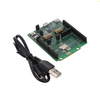
  • 1 X Module Arduino Evaluation Board (CYBT-263065-EVAL) with on-board AIROC™ Module (CYBT-263065-02)
  • 1 X USB Cable for USB – UART programming
  • Convenient user buttons
  • Bluetooth and Bluetooth module

To use the CYBT-263065-EVAL


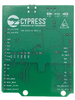
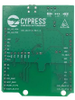
Figure 2: CYBT-263065-EVAL Bottom View

1) Configure the evaluation board headers/switches to the desired settings.

2) Connect the evaluation board to a PC via a USB cable.

3) Open ModusToolbox, and develop, program, and test your application.

Note: Recover the CYBT-263065-EVAL board before programming.

The Arduino-compatible headers (J3/J4/J6/J7) are optional connections, which provide additional I/O connections to the module and allow for other Arduino shields to be used during development.

SW1: Reset switch routed to the XRES connection on the module.

SW2: Recover switch routed to the UART_CTS connection on the module.

SW3: User-defined switch routed to the P0 connection on the module via J9.

SW4: Switch connecting HCI UART connections on the module to the host via USB.

SW5: Switch connecting PUART connections on the module to the host via USB.

J1: Connection for an external interface for direct HCI UART communication.

J2: Used for module power supply current measurement.

J3/J4/J6/J7: Arduino-compatible headers used with an Arduino-compatible shield.

J8: Configures the VDD voltage input to the module as shown in the following table:

J8 Jumper Configuration VDD Voltage Level
Short 1 & 2 3.0V
Open 1.8V
J8 Jumper Configuration VDD Voltage Level

J9: Connects the P0 pad on the module to SW3.

J10: Connects the P26 pad on the module to LED D1.

J11: Module power supply selection from LDO or external connector.

The EZ-BT CYBT-263065-02 Module supports Bluetooth SIG Mesh, is qualified for the Bluetooth 5.4 speci¬fication and is certifi¬ed for the 2.4-GHz unlicensed frequency range in USA (FCC), Canada (ISED), Europe (CE), and Japan (MIC).

Supplier's Site
Communication & Wireless Development Tools - 2601123 - RS Components, Ltd.
Corby, Northants, United Kingdom
Communication & Wireless Development Tools
2601123
Communication & Wireless Development Tools 2601123
Infineon CYBT-263065-EVAL

Infineon CYBT-263065-EVAL

Supplier's Site
RF, RFID, Wireless Evaluation Boards - 448-CYBT-263065-EVAL-ND - DigiKey
Thief River Falls, MN, United States
RF, RFID, Wireless Evaluation Boards
448-CYBT-263065-EVAL-ND
RF, RFID, Wireless Evaluation Boards 448-CYBT-263065-EVAL-ND
CYBT-263065-EVAL

CYBT-263065-EVAL

Buy Now Datasheet
Development Boards, Kits, Programmers - Evaluation Boards - RF Evaluation and Development Kits, Boards - CYBT-263065-EVAL - Acme Chip Technology Co., Limited
Shenzhen, China
Development Boards, Kits, Programmers - Evaluation Boards - RF Evaluation and Development Kits, Boards
CYBT-263065-EVAL
Development Boards, Kits, Programmers - Evaluation Boards - RF Evaluation and Development Kits, Boards CYBT-263065-EVAL
CYBT-263065-EVAL

CYBT-263065-EVAL

Supplier's Site

Technical Specifications

  Infineon Technologies AG RS Components, Ltd. DigiKey Acme Chip Technology Co., Limited
Product Category Electronic Development Boards Electronic Development Boards Electronic Development Boards Electronic Development Boards
Product Number CYBT-263065-EVAL 2601123 448-CYBT-263065-EVAL-ND CYBT-263065-EVAL
Product Name Evaluation Boards Communication & Wireless Development Tools RF, RFID, Wireless Evaluation Boards Development Boards, Kits, Programmers - Evaluation Boards - RF Evaluation and Development Kits, Boards
Category Developement Board Development Suite / Kit Developement Board
Unlock Full Specs
to access all available technical data

Similar Products

Development Boards, Kits, Programmers - Evaluation Boards - Evaluation and Demonstration Boards and Kits - CY4602 - Acme Chip Technology Co., Limited
Specs
Category Developement Board
Supported System USB 2.0 Hub
View Details
LED Development Tools - 2778755 - RS Components, Ltd.
Specs
Category Development Suite / Kit
View Details
3 suppliers
Evaluation Boards - CY3676 - Infineon Technologies AG
Infineon Technologies AG
Specs
Category Developement Board
Supported System Industrial automation ; Communication ; Infotainment
View Details
3 suppliers