Specifications:
PORT CONNECTORS: (7) BNC female coaxial connectors are labeled 1,2,3,4,5,6 and COM.
REMOTE CONTROL: (1) USB Type-B female connector labeled REMOTE accepts ASCII RS232 Serial Data for Remote Control operation.
FRONT PANEL CONTROLS: (7) Pushbuttons labeled 1, 2, 3, 4, 5, 6, and SCAN.
FRONT PANEL LED DISPLAY: (6) Red LED's display switch position and power status. (1) Yellow LED indicates scan mode.
POWER: UL approved 100VAC/240VAC, 50Hz/60Hz wall mount power module supplies 12 VDC, 500mA to the unit. Has 2-prong, US, non-polarized plug.
DIMENSIONS: 8.15"W x 2.38" H x 7.27" D. (20.8 x 6.1 x 18.5 cm)
WEIGHT: Approximately 2.1 lbs (1.0 kg)
Model 7196 BNC AutoScan Switch Application: The drawing illustrates a REMOTE monitor connected to the BNC COMMON port with access to six DVR's connected to the BNC ports labeled 1, 2, 3, 4, 5 and 6. Each of the six ports are connected to a DVR which in turn is connected to 16 CCTV cameras. The camera views can be seen on the REMOTE monitor. The remote USB-B port is connected to a laptop, so the user can control the AutoScan Switch with RS232 ASCII commands.
Features:
Each channel allows access to six DVR/Camera networks from one laptop computer.
Both the Center and Shell of the BNC interface are switched.
All BNC ports are impedance matched to support 75 Ohm equipment.
Eliminates the need to plug and unplug cables.
Local control via front-panel pushbutton.
The REMOTE port accepts RS232 Serial Data ASCII commands for switch position and control.
Front panel LED's display present position and power status.
Front panel pushbutton controls.
Scan mode allows automatic switching of positions at a set time interval.
Remote USB ASCII commands that allow the user to control switch position, lockout front panel operations, toggle scan mode, configure the scan for excluding ports, change scan interval, set default power up/down position, and obtain switch status.
The unit can be configured to maintain last set position on power loss and continue to pass data or to switch to a default power down position and continue to pass data.
On power up, the unit can be configured to maintain its position, to restore the position before the power down default, or to switch to default power up position.
Rugged aluminum case provides EMI/RFI shielding.
Custom length BNC cables available for your switch installation.
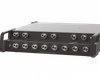
The PathWay® Model 7196 BNC 75 Ohm 6-1 AutoScan Switch with USB Serial Remote allows the user the capability of sharing a single BNC interface device, connected to the Common port, among six other devices connected to the 1,2,3,4,5, and 6 ports. The Model 7196 is packaged in a slim desktop style enclosure.
The switch may be controlled manually via the front panel pushbuttons or remotely from a USB Serial port located on the rear of the unit. Switch position states may be attained via the front panel LED display or the Remote USB Serial port located on the rear of the unit. The switch also can be operated by using the Scan feature for automatic switching to enabled ports at a set interval.
Specifications:
- PORT CONNECTORS: (7) BNC female coaxial connectors are labeled 1,2,3,4,5,6 and COM.
- REMOTE CONTROL: (1) USB Type-B female connector labeled REMOTE accepts ASCII RS232 Serial Data for Remote Control operation.
- FRONT PANEL CONTROLS: (7) Pushbuttons labeled 1, 2, 3, 4, 5, 6, and SCAN.
- FRONT PANEL LED DISPLAY: (6) Red LED's display switch position and power status. (1) Yellow LED indicates scan mode.
- POWER: UL approved 100VAC/240VAC, 50Hz/60Hz wall mount power module supplies 12 VDC, 500mA to the unit. Has 2-prong, US, non-polarized plug.
- DIMENSIONS: 8.15"W x 2.38" H x 7.27" D.
(20.8 x 6.1 x 18.5 cm)
- WEIGHT: Approximately 2.1 lbs (1.0 kg)
Model 7196 BNC AutoScan Switch Application: The drawing illustrates a REMOTE monitor connected to the BNC COMMON port with access to six DVR's connected to the BNC ports labeled 1, 2, 3, 4, 5 and 6. Each of the six ports are connected to a DVR which in turn is connected to 16 CCTV cameras. The camera views can be seen on the REMOTE monitor. The remote USB-B port is connected to a laptop, so the user can control the AutoScan Switch with RS232 ASCII commands.
Features:
- Each channel allows access to six DVR/Camera networks from one laptop computer.
- Both the Center and Shell of the BNC interface are switched.
- All BNC ports are impedance matched to support 75 Ohm equipment.
- Eliminates the need to plug and unplug cables.
- Local control via front-panel pushbutton.
- The REMOTE port accepts RS232 Serial Data ASCII commands for switch position and control.
- Front panel LED's display present position and power status.
- Front panel pushbutton controls.
- Scan mode allows automatic switching of positions at a set time interval.
- Remote USB ASCII commands that allow the user to control switch position, lockout front panel operations, toggle scan mode, configure the scan for excluding ports, change scan interval, set default power up/down position, and obtain switch status.
- The unit can be configured to maintain last set position on power loss and continue to pass data or to switch to a default power down position and continue to pass data.
- On power up, the unit can be configured to maintain its position, to restore the position before the power down default, or to switch to default power up position.
- Rugged aluminum case provides EMI/RFI shielding.
- Custom length BNC cables available for your switch installation.
The PathWay® Model 7196 BNC 75 Ohm 6-1 AutoScan Switch with USB Serial Remote allows the user the capability of sharing a single BNC interface device, connected to the Common port, among six other devices connected to the 1,2,3,4,5, and 6 ports. The Model 7196 is packaged in a slim desktop style enclosure.
The switch may be controlled manually via the front panel pushbuttons or remotely from a USB Serial port located on the rear of the unit. Switch position states may be attained via the front panel LED display or the Remote USB Serial port located on the rear of the unit. The switch also can be operated by using the Scan feature for automatic switching to enabled ports at a set interval.