Magma 1 Slot

Description
Are you married to your desktop, but don’t want to be? Is your power-hungry, heat-generating “desktop-only” PCI card stopping you from going mobile? Can’t get the special functionality you need in a laptop? Need to upgrade your server or desktop computer? New computer doesn’t have any PCI slots? Don’t want to lose your investment in pricey PCI cards that don’t fit the new computer? Does your PCI card use too much power? Does it run too hot? If your answer is “YES,” the Magma 1 Slot PCI Expansion System is your solution. You can install practically any PCI card into the Magma PCI Expansion System and connect it to your new or old computer. Prolong Your Investment The Magma 1 Slot PCI Expansion System allows you to plug-in a full-sized power-demanding, heat-generating PCI card into either a half-length or full-length chassis. It’s the most portable method for taking the PCI bus outside the computer. How else can you add so much power to a small form-factor desktop, or your brand-new laptop? Save Time, Money and Trouble Use your high-end PCI card wherever you are – without the expense of a “buying duplicate card” or “packing it along in your briefcase” to install in another computer upon arrive. Simply add your PCI card to the Magma expansion chassis and then connect the chassis to any host computer (laptop or desktop) using one of a variety of Magma host cards. Yes, even your laptop! The use of computer specific host cards makes using your unique PCI card as simple as “Plug & Play” because all you need to do is to connect the MAGMA PCI Expansion System to the host card for your computer and turn it on. Use the same PCI card on your laptop as you do on your desktop or server – just add a Magma host card and connect the cable. Familiarity Breeds Success Setting up your PCI card in a portable chassis provides you an opportunity to use a consistent hardware configuration – regardless of what type of computer is available. Being able to “hit the ground running” is vital to every successful venture. Being able to use “the same PCI card,” regardless of location also reduces project risks. Host cards are available for the following systems: (1) Laptop: CardBus or ExpressCard and (2) Desktop/Server: 32 or 64-Bit PCI, or x1 PCI Express.
Datasheet
Description
Are you married to your desktop, but don’t want to be? Is your power-hungry, heat-generating “desktop-only” PCI card stopping you from going mobile? Can’t get the special functionality you need in a laptop? Need to upgrade your server or desktop computer? New computer doesn’t have any PCI slots? Don’t want to lose your investment in pricey PCI cards that don’t fit the new computer? Does your PCI card use too much power? Does it run too hot? If your answer is “YES,” the Magma 1 Slot PCI Expansion System is your solution. You can install practically any PCI card into the Magma PCI Expansion System and connect it to your new or old computer. Prolong Your Investment The Magma 1 Slot PCI Expansion System allows you to plug-in a full-sized power-demanding, heat-generating PCI card into either a half-length or full-length chassis. It’s the most portable method for taking the PCI bus outside the computer. How else can you add so much power to a small form-factor desktop, or your brand-new laptop? Save Time, Money and Trouble Use your high-end PCI card wherever you are – without the expense of a “buying duplicate card” or “packing it along in your briefcase” to install in another computer upon arrive. Simply add your PCI card to the Magma expansion chassis and then connect the chassis to any host computer (laptop or desktop) using one of a variety of Magma host cards. Yes, even your laptop! The use of computer specific host cards makes using your unique PCI card as simple as “Plug & Play” because all you need to do is to connect the MAGMA PCI Expansion System to the host card for your computer and turn it on. Use the same PCI card on your laptop as you do on your desktop or server – just add a Magma host card and connect the cable. Familiarity Breeds Success Setting up your PCI card in a portable chassis provides you an opportunity to use a consistent hardware configuration – regardless of what type of computer is available. Being able to “hit the ground running” is vital to every successful venture. Being able to use “the same PCI card,” regardless of location also reduces project risks. Host cards are available for the following systems: (1) Laptop: CardBus or ExpressCard and (2) Desktop/Server: 32 or 64-Bit PCI, or x1 PCI Express.
Datasheet

Suppliers

Company
Product
Description
Supplier Links
1 Slot -  - Magma
San Diego, CA, USA
1 Slot
1 Slot
Are you married to your desktop, but don’t want to be? Is your power-hungry, heat-generating “desktop-only” PCI card stopping you from going mobile? Can’t get the special functionality you need in a laptop? Need to upgrade your server or desktop computer? New computer doesn’t have any PCI slots? Don’t want to lose your investment in pricey PCI cards that don’t fit the new computer? Does your PCI card use too much power? Does it run too hot? If your answer is “YES,” the Magma 1 Slot PCI Expansion System is your solution. You can install practically any PCI card into the Magma PCI Expansion System and connect it to your new or old computer. Prolong Your Investment The Magma 1 Slot PCI Expansion System allows you to plug-in a full-sized power-demanding, heat-generating PCI card into either a half-length or full-length chassis. It’s the most portable method for taking the PCI bus outside the computer. How else can you add so much power to a small form-factor desktop, or your brand-new laptop? Save Time, Money and Trouble Use your high-end PCI card wherever you are – without the expense of a “buying duplicate card” or “packing it along in your briefcase” to install in another computer upon arrive. Simply add your PCI card to the Magma expansion chassis and then connect the chassis to any host computer (laptop or desktop) using one of a variety of Magma host cards. Yes, even your laptop! The use of computer specific host cards makes using your unique PCI card as simple as “Plug & Play” because all you need to do is to connect the MAGMA PCI Expansion System to the host card for your computer and turn it on. Use the same PCI card on your laptop as you do on your desktop or server – just add a Magma host card and connect the cable. Familiarity Breeds Success Setting up your PCI card in a portable chassis provides you an opportunity to use a consistent hardware configuration – regardless of what type of computer is available. Being able to “hit the ground running” is vital to every successful venture. Being able to use “the same PCI card,” regardless of location also reduces project risks. Host cards are available for the following systems: (1) Laptop: CardBus or ExpressCard and (2) Desktop/Server: 32 or 64-Bit PCI, or x1 PCI Express.

Are you married to your desktop, but don’t want to be? Is your power-hungry, heat-generating “desktop-only” PCI card stopping you from going mobile? Can’t get the special functionality you need in a laptop? Need to upgrade your server or desktop computer? New computer doesn’t have any PCI slots? Don’t want to lose your investment in pricey PCI cards that don’t fit the new computer? Does your PCI card use too much power? Does it run too hot?
If your answer is “YES,” the Magma 1 Slot PCI Expansion System is your solution. You can install practically any PCI card into the Magma PCI Expansion System and connect it to your new or old computer.

Prolong Your Investment
The Magma 1 Slot PCI Expansion System allows you to plug-in a full-sized power-demanding, heat-generating PCI card into either a half-length or full-length chassis. It’s the most portable method for taking the PCI bus outside the computer. How else can you add so much power to a small form-factor desktop, or your brand-new laptop?

Save Time, Money and Trouble
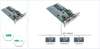
Use your high-end PCI card wherever you are – without the expense of a “buying duplicate card” or “packing it along in your briefcase” to install in another computer upon arrive. Simply add your PCI card to the Magma expansion chassis and then connect the chassis to any host computer (laptop or desktop) using one of a variety of Magma host cards. Yes, even your laptop!

The use of computer specific host cards makes using your unique PCI card as simple as “Plug & Play” because all you need to do is to connect the MAGMA PCI Expansion System to the host card for your computer and turn it on. Use the same PCI card on your laptop as you do on your desktop or server – just add a Magma host card and connect the cable.

Familiarity Breeds Success
Setting up your PCI card in a portable chassis provides you an opportunity to use a consistent hardware configuration – regardless of what type of computer is available. Being able to “hit the ground running” is vital to every successful venture. Being able to use “the same PCI card,” regardless of location also reduces project risks.

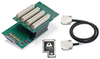
Host cards are available for the following systems: (1) Laptop: CardBus or ExpressCard and (2) Desktop/Server: 32 or 64-Bit PCI, or x1 PCI Express.

Supplier's Site Datasheet

Technical Specifications

  Magma
Product Category PCI Products
Product Name 1 Slot
Technology PCI
Unlock Full Specs
to access all available technical data

Similar Products

PBpro PCI Express -  - Softing Inc. Industrial Automation
Softing Inc. Industrial Automation
Specs
Technology PCI
View Details
48 Digital Input/Output Cards - PCI-DIO-48 - ACCES I/O Products, Inc.
Specs
Technology PCI
Form Factor Full
Number of Ports 48
View Details
IEEE 488.2 Standard PCI Interface - PCI-488 - Measurement Computing
Specs
Technology PCI
Form Factor Full
PCI Data Bus 32Bit
View Details