RGB Spectrum
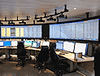
RGB Spectrum's MultiPoint KvM solution surpasses capabilities of traditional KVM systems. It is the only KVM solution combining high-resolution, uncompressed graphics, multi-screen displays, ease of navigation, and a flexible control station architecture. Its modular architecture provides much-needed flexibility while its navigational features increase work flow efficiencies. MultiPoint KvM meets the demanding requirements of control centers in a variety of industries, including oil and gas, utilities, security, government, military, and broadcast. The solution's control station architecture is extremely flexible. Control stations are computers providing KVM functionality for each operations desk, which is comprised of a multi-screen display, a keyboard and a mouse. Control stations can be run in exclusive or collaborative mode, the latter to allow multiple users to display and act on the same content simultaneously. MultiPoint KvM also supports the notion of a control station user, individually authorized to access the system at any or all physical control stations. When an authorized user is identified and verified at a control station, it is reconfigured with the user's default configuration and assigned permissions. KlickSimple navigation goes beyond controlling one computer at a time, typical of traditional KVM systems. KlickSimple navigation offers a seamless method of controlling multiple computers with a single mouse and keyboard, using only the mouse for selecting computers and providing control. The MultiPoint KvM solution supports switching and display of uncompressed, high-resolution, digitized graphics and video at resolutions of up to 2048 by 1200 pixels, enabled by the integrated Linx? switcher. This makes it ideal for applications requiring visualization of details, such as two-and three-dimensional representation of soil strata for identification of oil and gas deposits, missile launch depictions, or utility maps. MultiPoint KvM uses an innovative hybrid approach for display and control. A high-performance DVI or RGB Linx switcher is used to route the video and graphics displays, while keyboard and mouse control signals are switched over IP. This architecture allows administrators to take advantage of the intelligence inherent to IP, provides high resolution video and graphics, and keeps network bandwidth demands to a minimum . MultiPoint KvM solution components The MultiPoint KvM solution is comprised of the following
Number of controlled computers (switcher inputs): 32
Number of individually switchable monitors (switcher outputs): 32
Number of control stations: 32
Number of users: 100
Number of administrators: 1
KlickSimple technology with seamless, multi-screen navigation
"Real-time" mouse movement response (5ms)
Any contiguous monitor geometry supported
Quick routing of inputs (200ms)
Easy MultiPoint KvM setup via control application
"Desktop" navigation panel for intuitive navigation and display of pertinent information
Advanced user management, including access rights and default settings
Mouse and keyboard emulation via RDA software or external Ethernet to USB converter
Windows (2000, XP and Vista XP) and Linux support
RGB Spectrum
RGB Spectrum's MultiPoint KvM solution surpasses capabilities of traditional KVM systems. It is the only KVM solution combining high-resolution, uncompressed graphics, multi-screen displays, ease of navigation, and a flexible control station architecture. Its modular architecture provides much-needed flexibility while its navigational features increase work flow efficiencies. MultiPoint KvM meets the demanding requirements of control centers in a variety of industries, including oil and gas, utilities, security, government, military, and broadcast. The solution's control station architecture is extremely flexible. Control stations are computers providing KVM functionality for each operations desk, which is comprised of a multi-screen display, a keyboard and a mouse. Control stations can be run in exclusive or collaborative mode, the latter to allow multiple users to display and act on the same content simultaneously. MultiPoint KvM also supports the notion of a control station user, individually authorized to access the system at any or all physical control stations. When an authorized user is identified and verified at a control station, it is reconfigured with the user's default configuration and assigned permissions. KlickSimple™ navigation goes beyond controlling one computer at a time, typical of traditional KVM systems. KlickSimple navigation offers a seamless method of controlling multiple computers with a single mouse and keyboard, using only the mouse for selecting computers and providing control. The MultiPoint KvM solution supports switching and display of uncompressed, high-resolution, digitized graphics and video at resolutions of up to 2048 by 1200 pixels, enabled by the integrated Linx? switcher. This makes it ideal for applications requiring visualization of details, such as two-and three-dimensional representation of soil strata for identification of oil and gas deposits, missile launch depictions, or utility maps. MultiPoint KvM uses an innovative hybrid approach for display and control. A high-performance DVI or RGB Linx switcher is used to route the video and graphics displays, while keyboard and mouse control signals are switched over IP. This architecture allows administrators to take advantage of the intelligence inherent to IP, provides high resolution video and graphics, and keeps network bandwidth demands to a minimum . MultiPoint KvM solution components The MultiPoint KvM solution is comprised of the following
- Number of controlled computers (switcher inputs): 32
- Number of individually switchable monitors (switcher outputs): 32
- Number of control stations: 32
- Number of users: 100
- Number of administrators: 1
- KlickSimple technology with seamless, multi-screen navigation
- "Real-time" mouse movement response (5ms)
- Any contiguous monitor geometry supported
- Quick routing of inputs (200ms)
- Easy MultiPoint KvM setup via control application
- "Desktop" navigation panel for intuitive navigation and display of pertinent information
- Advanced user management, including access rights and default settings
- Mouse and keyboard emulation via RDA software or external Ethernet to USB converter
- Windows (2000, XP and Vista XP) and Linux support