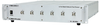
The quantum data 980 DP Video Generator / Analyzer module is equipped with all the standard video timings and test patterns for testing high end displays including tests for protocols such as HDCP and EDID.
You can configure the list of video format timings and test patterns using the Format List Editor and Image List Editor. This facilitates convenient and quick access during testing. The module provides a Format Editor for creating custom format timings or for quickly making modifications to existing timings for testing.
The 980 DP Video Generator / Analyzer module offers a variety of features for testing DisplayPort protocols. You can control the module’s link training parameters through the user friendly 980 GUI Manager. You can set the limits on the lane count and link rate and allow the link training engine to establish link training based on those limitations or you can force link training parameters—lane count, link rate, voltage swing, pre-emphasis.
The 980 DP Video Generator / Analyzer module offers a comprehensive solution for HDCP 2.2/2.3 compliance testing covering sources, sinks and repeaters which has now been approved by Digital Content Protection (DCP).
The 980 DP Video Generator / Analyzer module now offers DisplayPort 1.2 Link Layer compliance testing for sink devices (displays).
The EDID Decode feature enables you to examine the contents of the EDID of the connected display in human readable text. The DPCD Decode feature enables you to examine the DPCD registers of the connected display in human readable text.
The optional Auxiliary Channel Analyzer (ACA) application enables you to monitor the DisplayPort Aux Channel for link training and HDCP transactions--versio
The 980 DP1.2 Video Generator / Analyzer module can be controlled either through the PC-based 980 GUI Manager or through the embedded 980 GUI Manager running on the 980B itself. The 980B’s built-in color touch screen provides a graphical user interface (GUI) to control the instrument and to view incoming video and metadata in the Real Time mode when using the module’s optional analyzer feature available in subsequent releases.
The following is a list of options for the DisplayPort 1.4 Video Generator module. Please note that all functionality is optioned.
Video Generator option – Enables you to emulate a DisplayPort source device for video pattern testing. The option includes a wide range of timing formats and patterns and selectable color space, color depth, pixel encoding, quantization ranges and the ability to emulate an HDCP 1.3 source. The option also includes the ability to emulate a Multi-Stream Transport (MST) source.
Basic Analyzer option – Enables you to view the incoming video, number of lanes, link rate, timing calorimetry and various other metadata in real time at a glance. This feature provides a basic confidence test to verify that the incoming video is essentially correct. The Basic Analyzer also enables you to emulate any EDID on the Rx port to test a source devices handling of various EDIDs. You can also configure DPCD registers for emulating on the DP Rx port. The Basic Analyzer option also enables you to emulate a DisplayPort Multi-Stream Transport (MST) branch device and MST sink nodes. The emulation capability includes the ability to present EDIDs from downstream MST sink devices and to provide a response to DPCD reads.
Protocol Analyzer (Capture/Analysis) option – Requires the Basic Analyzer option. It enables you capture the main link attributes and diagnose interoperability issues related to them. The Protocol Analyzer captures and stores main link data and provides visibility into main stream attributes, secondary data elements, K-Characters and protocol errors. The Protocol Analyzer presents these elements on a graphical timeline and in a table. You can select any transaction in the table and view its details. The capture utility also enables you to capture specific MST streams from the source. NEW! The trigger mechanisms for the capture analysis function enable developers to set conditions to ensure that the captured data includes the information they are most interested in.
NEW! Display Stream Compression (DSC) Analysis option – The module’s DSC analysis feature enables developers to view the DisplayPort DSC related protocol elements such as the picture parameter set, end of chunk packets and compression flag settings in the VBID to ensure that these elements are occurring in the video stream and that they are occurring in the proper sequence. The DSC analysis feature also captures and decompresses the video frames enabling developers to examine them for compression artifacts. The Forward Error Correction (FEC) transport mechanism, which ensures reliable, error free video transport, can also be verified.
NEW! DisplayPort Link Layer 1.4 HBR3 Source Compliance Test option – This new compliance test package (Package #3) initially includes eighteen (23) HBR3 source link layer compliance tests which test the link training and other functions at rates up to HBR3. Tests from following Sections are supported: Link Training 4.3.1, Link Maintenance 4.3.2, Video 4.3.3, Audio 4.4.4 and Link Training (Other) 400.1. This test suite enables developers of 1.4-capable DisplayPort source devices to test their source devices for link layer compliance. Once initiated, the tests run to completion with limited user interaction required. When a test series has been completed, the instrument issues a detailed report that provides pass/fail results for each individual test. You can link to the aux channel transactions recording during the test. Reports and the raw log files can be viewed through 980 GUI Manager and can be distributed to colleagues and other subject matter experts for analysis.
NEW! DisplayPort Link Layer 1.4 HBR3 Sink Compliance Test option – This new compliance test package (Package #3) initially includes thirty-eight (38) HBR3 source link layer compliance tests which test the link training and other functions at rates up to HBR3. Tests from the following Sections are supported: Aux Chan protocol 5.2.1, Link Training 5.3.1, Link Maintenance 5.3.2, Main Video 5.4.1/2, Main Audio 5.4.4, DPCD 7.2.1, and 500.1 and 600.1. This test suite enables developers of 1.4-capable DisplayPort source devices to test their sink devices for link layer compliance. Once initiated, the tests run to completion with limited user interaction required. When a test series has been completed, the instrument issues a detailed report that provides pass/fail results for each individual test. You can link to the aux channel transactions recording during the test. Reports and the raw log files can be viewed through 980 GUI Manager and can be distributed to colleagues and other subject matter experts for analysis.
DisplayPort Auxiliary Channel Analyzer (ACA) option – The optional Auxiliary Channel Analyzer (ACA) utility supports monitoring of hot plug events, EDID exchanges, HDCP authentication, DPCD register reads, link training transactions and MST negotiations between a DP source and the DP module’s Rx port. The ACA logs these events and assigns precise timestamps to them. Once captured you can view the details of each transaction. The ACA enables you to pinpoint various failures on the DisplayPort link. These ACA can be saved and disseminated for further analysis by colleagues and other subject matter experts.
DisplayPort Passive Auxiliary Channel Analyzer (ACA) option – The optional passive Auxiliary Channel Analyzer (ACA) utility supports monitoring of hot plug events, EDID exchanges, HDCP authentication, DPCD register reads, link training transactions and MST negotiations passively between a DP source and a DP display. The option includes activation of the adjunct board and requires the use of a custom cable provided by Teledyne LeCroy. The ACA logs these events and assigns precise timestamps to them. Once captured you can view details of each transaction. The ACA enables you to pinpoint various failures on the DisplayPort link. These ACA can be saved and disseminated for further analysis by colleagues and other subject matter experts.
DisplayPort Link Layer 1.2 Core Sink Compliance Test option – This option allows the DisplayPort module Tx interface to run DP Link Layer compliance tests on display devices. Once initiated, the tests run to completion with limited user interaction required. When a test series has been completed, the instrument issues a detailed report that provides pass/fail results for each individual test. You can link to the aux channel transactions recording during the test. Reports and the raw log files can be viewed through 980 GUI Manager and can be distributed to colleagues and other subject matter experts for analysis.
HDCP 2.2/2.3 Compliance Test option (DCP approved) – There are three (3) separate options for running HDCP 2.2/2.3 compliance tests on source, display and repeater devices. Once initiated, the tests run to completion with limited user interaction required. When a test series has been completed, the instrument issues a detailed report that provides pass/fail results for each individual test. You can link to the aux channel transactions recording during the test. Reports and the raw log files can be viewed through 980 GUI Manager and can be distributed to colleagues and other subject matter experts for analysis.
HDCP 2.2/2.3 Functional Test option – This option allows the DisplayPort module Tx interface to authenticate and encrypt in accordance with HDCP 2.2/2.3. This functionality requires the optional Video Generator Function. The option also allows the DP module Rx interface to authenticate and decrypt per HDCP 2.2/2.3 receiver. This functionality requires the optional basic analyzer function. The option also includes the ability to emulate an HDCP 2.2/2.3 repeater with selectable emulated cascade depth and emulated device count.
| Teledyne LeCroy | |
|---|---|
| Product Category | Network Test Equipment |
| Product Number | Quantumdata™ 980 DisplayPort 1.4 |
| Product Name | Video Generator / Analyzer Module |
| Equipment Type | Protocol Analyzer; Video Generator |