GL Communications, Inc. Voice Call Management Utility (CMU) CMU031

Description
Managing recorded voice calls is essential especially when recording for extended periods of time. The job of managing recorded voice calls is easier when calls can be sorted or filtered by called or calling number, time of day, or length of call. GL's Call Management Utility (CMU) application included with GL's T1 E1 Call Capture and Analysis (CCA) provides all the necessary management tools to perform exactly such monitoring functions for ISDN, SS7, and CAS calls over T1 or E1 networks. Call records are immediately generated, indexed, and displayed once a voice recording over T1, E1, or 2-Wire lines is completed by the CCA. The GL’s T1 E1 Analysis boards allow easy bridging/monitoring connections to a T1 E1 interfaces. By tapping T1 E1 lines, Call Capture and Analysis (CCA) captures SS7, ISDN, and CAS calls on East, West, or both the directions simultaneously. The GL T1/E1 Analysis boards allow easy bridging/monitoring connections to a T1 E1 interfaces. By tapping T1 E1 lines, Call Capture and Analysis (CCA) captures SS7, ISDN, and CAS calls on East, West, or both the directions simultaneously.The CMU then can be used to pull all the voice files in real-time from the user-defined capture directory of CCA for generating the call records. Recorded calls can be further filtered or played back or analyzed as required. All relevant information associated with each recorded call is included such as, timestamp, timeslot, length of call, and the size of voice file. The user may configure a different filters for each monitoring instance. The user also have the option to display all Completed Calls, Active Calls (shows real-time capturing information), or a user-defined filtered list of all Completed Calls. The most important feature of CMU is the ASR Listener, which provides the capability to remotely access the recording in progress (real-time) from multiple T1E1 probes. As indicated in the block diagram above, CMU can work with multiple GL's T1E1 CCA probes using ASR listener to monitor call recording remotely. . Using the CMU post-processing feature, the user has the fundamental capability to play each voice file. Audio playback of completed and captured calls allows a captured call to be instantly played to the PC speakers, either in the East direction, or the West direction, or both directions simultaneously. The audio files can also be analyzed using a waveform viewer for further troubleshooting. Main Features Complete call records for each captured file. Filter/Search for specific calls. Post process capability to view the directory of captured files, log files and instances. Streaming audio files over TCP/IP and playback voice on either East, West, or both the directions simultaneously. Real-time voice playback (during active call) and post-processing voice playback (after call is completed). Statistics for all call records. Works as complete automated T1 and E1 voice logger
Datasheet
Description
Managing recorded voice calls is essential especially when recording for extended periods of time. The job of managing recorded voice calls is easier when calls can be sorted or filtered by called or calling number, time of day, or length of call. GL's Call Management Utility (CMU) application included with GL's T1 E1 Call Capture and Analysis (CCA) provides all the necessary management tools to perform exactly such monitoring functions for ISDN, SS7, and CAS calls over T1 or E1 networks. Call records are immediately generated, indexed, and displayed once a voice recording over T1, E1, or 2-Wire lines is completed by the CCA. The GL’s T1 E1 Analysis boards allow easy bridging/monitoring connections to a T1 E1 interfaces. By tapping T1 E1 lines, Call Capture and Analysis (CCA) captures SS7, ISDN, and CAS calls on East, West, or both the directions simultaneously. The GL T1/E1 Analysis boards allow easy bridging/monitoring connections to a T1 E1 interfaces. By tapping T1 E1 lines, Call Capture and Analysis (CCA) captures SS7, ISDN, and CAS calls on East, West, or both the directions simultaneously.The CMU then can be used to pull all the voice files in real-time from the user-defined capture directory of CCA for generating the call records. Recorded calls can be further filtered or played back or analyzed as required. All relevant information associated with each recorded call is included such as, timestamp, timeslot, length of call, and the size of voice file. The user may configure a different filters for each monitoring instance. The user also have the option to display all Completed Calls, Active Calls (shows real-time capturing information), or a user-defined filtered list of all Completed Calls. The most important feature of CMU is the ASR Listener, which provides the capability to remotely access the recording in progress (real-time) from multiple T1E1 probes. As indicated in the block diagram above, CMU can work with multiple GL's T1E1 CCA probes using ASR listener to monitor call recording remotely. . Using the CMU post-processing feature, the user has the fundamental capability to play each voice file. Audio playback of completed and captured calls allows a captured call to be instantly played to the PC speakers, either in the East direction, or the West direction, or both directions simultaneously. The audio files can also be analyzed using a waveform viewer for further troubleshooting. Main Features Complete call records for each captured file. Filter/Search for specific calls. Post process capability to view the directory of captured files, log files and instances. Streaming audio files over TCP/IP and playback voice on either East, West, or both the directions simultaneously. Real-time voice playback (during active call) and post-processing voice playback (after call is completed). Statistics for all call records. Works as complete automated T1 and E1 voice logger
Datasheet

Suppliers

Company
Product
Description
Supplier Links
Voice Call Management Utility (CMU) - CMU031 - GL Communications, Inc.
Gaithersburg, MD, United States
Voice Call Management Utility (CMU)
CMU031
Voice Call Management Utility (CMU) CMU031
Managing recorded voice calls is essential especially when recording for extended periods of time. The job of managing recorded voice calls is easier when calls can be sorted or filtered by called or calling number, time of day, or length of call. GL's Call Management Utility (CMU) application included with GL's T1 E1 Call Capture and Analysis (CCA) provides all the necessary management tools to perform exactly such monitoring functions for ISDN, SS7, and CAS calls over T1 or E1 networks. Call records are immediately generated, indexed, and displayed once a voice recording over T1, E1, or 2-Wire lines is completed by the CCA. The GL’s T1 E1 Analysis boards allow easy bridging/monitoring connections to a T1 E1 interfaces. By tapping T1 E1 lines, Call Capture and Analysis (CCA) captures SS7, ISDN, and CAS calls on East, West, or both the directions simultaneously. The GL T1/E1 Analysis boards allow easy bridging/monitoring connections to a T1 E1 interfaces. By tapping T1 E1 lines, Call Capture and Analysis (CCA) captures SS7, ISDN, and CAS calls on East, West, or both the directions simultaneously.The CMU then can be used to pull all the voice files in real-time from the user-defined capture directory of CCA for generating the call records. Recorded calls can be further filtered or played back or analyzed as required. All relevant information associated with each recorded call is included such as, timestamp, timeslot, length of call, and the size of voice file. The user may configure a different filters for each monitoring instance. The user also have the option to display all Completed Calls, Active Calls (shows real-time capturing information), or a user-defined filtered list of all Completed Calls. The most important feature of CMU is the ASR Listener, which provides the capability to remotely access the recording in progress (real-time) from multiple T1E1 probes. As indicated in the block diagram above, CMU can work with multiple GL's T1E1 CCA probes using ASR listener to monitor call recording remotely. . Using the CMU post-processing feature, the user has the fundamental capability to play each voice file. Audio playback of completed and captured calls allows a captured call to be instantly played to the PC speakers, either in the East direction, or the West direction, or both directions simultaneously. The audio files can also be analyzed using a waveform viewer for further troubleshooting. Main Features Complete call records for each captured file. Filter/Search for specific calls. Post process capability to view the directory of captured files, log files and instances. Streaming audio files over TCP/IP and playback voice on either East, West, or both the directions simultaneously. Real-time voice playback (during active call) and post-processing voice playback (after call is completed). Statistics for all call records. Works as complete automated T1 and E1 voice logger

Managing recorded voice calls is essential especially when recording for extended periods of time. The job of managing recorded voice calls is easier when calls can be sorted or filtered by called or calling number, time of day, or length of call.

GL's Call Management Utility (CMU) application included with GL's T1 E1 Call Capture and Analysis (CCA) provides all the necessary management tools to perform exactly such monitoring functions for ISDN, SS7, and CAS calls over T1 or E1 networks. Call records are immediately generated, indexed, and displayed once a voice recording over T1, E1, or 2-Wire lines is completed by the CCA. The GL’s T1 E1 Analysis boards allow easy bridging/monitoring connections to a T1 E1 interfaces. By tapping T1 E1 lines, Call Capture and Analysis (CCA) captures SS7, ISDN, and CAS calls on East, West, or both the directions simultaneously.

The GL T1/E1 Analysis boards allow easy bridging/monitoring connections to a T1 E1 interfaces. By tapping T1 E1 lines, Call Capture and Analysis (CCA) captures SS7, ISDN, and CAS calls on East, West, or both the directions simultaneously.The CMU then can be used to pull all the voice files in real-time from the user-defined capture directory of CCA for generating the call records.

Recorded calls can be further filtered or played back or analyzed as required. All relevant information associated with each recorded call is included such as, timestamp, timeslot, length of call, and the size of voice file. The user may configure a different filters for each monitoring instance. The user also have the option to display all Completed Calls, Active Calls (shows real-time capturing information), or a user-defined filtered list of all Completed Calls.

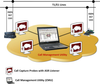
The most important feature of CMU is the ASR Listener, which provides the capability to remotely access the recording in progress (real-time) from multiple T1E1 probes. As indicated in the block diagram above, CMU can work with multiple GL's T1E1 CCA probes using ASR listener to monitor call recording remotely.
.
Using the CMU post-processing feature, the user has the fundamental capability to play each voice file. Audio playback of completed and captured calls allows a captured call to be instantly played to the PC speakers, either in the East direction, or the West direction, or both directions simultaneously. The audio files can also be analyzed using a waveform viewer for further troubleshooting.

Main Features

  • Complete call records for each captured file.
  • Filter/Search for specific calls.
  • Post process capability to view the directory of captured files, log files and instances.
  • Streaming audio files over TCP/IP and playback voice on either East, West, or both the directions simultaneously.
  • Real-time voice playback (during active call) and post-processing voice playback (after call is completed).
  • Statistics for all call records.
  • Works as complete automated T1 and E1 voice logger
Supplier's Site Datasheet

Technical Specifications

  GL Communications, Inc.
Product Category Communications Software
Product Number CMU031
Product Name Voice Call Management Utility (CMU)
Unlock Full Specs
to access all available technical data

Similar Products