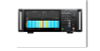
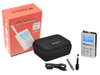
The AT-1000 is an analyzer from Fluke. Analyzers are key tools to test electronic equipment in the engineering, medical, automotive, and technological industries. Use analyzers for monitoring the performances of many different types of electronic devices. You may need analyzers for the measurement of components such as audio spectrums, voltages and currents, signals, and frequencies.
Additional Features:
Verification of Ethernet on copper or fiber up to 1 GB/s
TruePower™ over Ethernet (PoE) testing up to 802.3at (25.5W)
Cable testing and fault identification
IPv4/IPv6 ready
Powers up in 3 seconds
Stores up to 50 reports
Overview
LinkRunner AT provides the answers you need to quickly troubleshoot connectivity problems:
Where does this cable or jack go?
How is this switch port provisioned?
Can I negotiate a Gigabit link?
Are there 802.1x security conflicts?
Are the DHCP and DNS servers working?
Can I get enough power from this port?
Can I connect to servers and the Internet with IPv4 and IPv6?
Can I connect over copper or fiber links?
Is this patch cable good?
Network technicians and desktop support professionals are under ever-increasing pressure to deploy new infrastructure and ensure user satisfaction.
To address these challenges, LinkRunner AT Network Auto-Tester provides the fastest way to solve network connectivity problems.
Powering up in under three seconds, its one-button AutoTest performs your required set of connectivity tests in seconds, enabling you to quickly and accurately identify and solve network problems.
In seconds, the LinkRunner AutoTest provides these answers and more on a brightly colored display that’s easy to read under desks or outdoors. You can document your test results with two quick keystrokes to prove the job’s done right. With a six hour battery life and rugged design, LinkRunner can work wherever and whenever you need it.
Instant-on operation—ready to run your first test in less than three seconds.
Get answers fast—user-defined AutoTest performs your required set of connectivity tests in seconds, enabling you to accurately and quickly identify and solve network problems.
Verify connection at 10/100/1 G over copper or 100/1 G over fiber—connect using copper or fiber, turn it on to see link status, connection type, signal strength and traffic.
Nearest switch and VLAN information—uses IEEE Link Layer Discovery Protocol (LLDP) plus the Cisco® and Extreme Discovery Protocols (CDP and EDP) to display the VLAN and nearest switch model, slot and port.
TruePower™ PoE testing—quickly validate PoE performance by drawing actual power up to the 802.3at standard 25.5W. Load the circuit to stress switches, cabling and patch panels, all while measuring the voltage and pairs being used. The ability to validate the TruePower delivery before installing cameras, AP’s and phones ensures smooth deployment.
802.1x authentication—verify access to secure networks using 802.1x and MAC Access Control Lists (ACL). The included LinkRunner Manager software configures 802.1x EAP type, downloads certificates and enters passwords.
Cable verification and toning—check patch cables using the built-in wiremap port including pin-to-pin connection, or installed wiring for length, shorts, opens or split pairs. The optional office locator kit allows identification of up to six unique ports for documenting cable plants.
IPv4/IPv6 ready—supports both IPv4 and IPv6.
Key device and application availability— instead of a ping, which is often blocked or disabled, LinkRunner performs a TCP port open test to verify application connectivity using IPv4 and IPv6. Router, DNS and DHCP servers are reported.
Document results—store up to 50 complete test results and download to your PC with the push of a button.
Designed for field use—six-hour battery life, one-handed operation and a rugged design.
Easy upgrades—the mini-USB port allows software upgrades in the field in minutes.
LinkRunner AT Functions
Graphical Cable Wiremap and Cable Details
Finds opens, shorts, mis-wires and split pairs on non-terminated cable with a WireView Cable Identifier and built-in wiremap port.
Cable Tests
Locate cable runs with toning, port advertisement, link blinking and wiremapping with up to six cable identifiers. Toning supports both analog and digital IntelliTone™ modes.
Switch Information
LinkRunner AT displays critical nearest switch information including:
Switch name and model
IP address
Port, slot and VLAN
Duplex and speed (actual and advertised)
Signal strength
Connection MDI or MDI/X
PoE voltage and power (actual and test limits)
Graphical representation of power on pairs
TruePower™ PoE Loading (only available on the AT-2000)
Verify you are receiving the required current and voltage up to 25.5W to power your PoE enabled devices. The LinkRunner TruePower PoE loading draws actual power to verify that your PoE enabled devices will have the required power to function.
AutoTest
Verify enterprise connectivity in seconds with AutoTest. Standardize your set of critical network tests in profiles to run every time.
Tests include:
PoE (copper only) class
Link speed and duplex (actual and advertised)
RX pair and polarity
802.1x authentication
Switch name, port, VLAN, model and IP
DHCP auto-negotiation with subnet and DHCP server addresses
IPv4 and IPv6 availability
Ping and TCP port connectivity with lost and min, max and average speed
Ping and TCP Port Connectivity
Verify connectivity to key devices with ping and TCP connectivity testing. Devices automatically include a router, DNS server and DHCP server. Configure 10 additional devices to meet your requirements by URL or IPv4/IPv6 address and optional application port number.
Reflector
The LinkRunner packet reflector mode allows it to be used as a remote device during throughput tests to validate LAN and WAN throughput capabilities.
LinkRunner Manager Software
Included with LinkRunner, the LinkRunner Manager software gives you the ability to manage LinkRunner profiles and manage recorded sessions.
Profiles
The Profiles feature allows you to standardize your critical tests into one or more profiles making it easy for staff to produce consistent test results. For example, use one profile to verify connectivity to key devices or applications and another to verify connectivity to other locations. You can also name and transfer up to 10 profiles between LinkRunner and your PC.
The Profiles feature also allows you to configure, manage and control the use of your LinkRunner—or an entire fleet of them—with the following settings:
Enable IPv6 addressing
IP configuration including DHCP or static addresses
VLAN and connection configuration including 802.1x security, speed/duplex settings and VLAN ID and priority
AutoTest configuration for 10 devices
PoE configuration and loading
Reflector mode configuration
Record Test Results
Document what LinkRunner is seeing to share or archive. Creating reports allows you to quickly close trouble tickets or provide documentation for problem escalation.
Press one key to record all the collected details for:
AutoTest results
Switch results
Cable results
Transfer sessions to a PC and easily view or store them using LinkRunner Manager.
Multiple language support
LinkRunner AT fully supports multiple languages including English, French, German, Spanish, Portuguese, Russian, Japanese and Simplified Chinese. Multi-language support includes LinkRunner AT user interface, getting started guide, user manual and supporting LinkRunner Manager software, help files and user reports.
The AT-1000 is an analyzer from Fluke. Analyzers are key tools to test electronic equipment in the engineering, medical, automotive, and technological industries. Use analyzers for monitoring the performances of many different types of electronic devices. You may need analyzers for the measurement of components such as audio spectrums, voltages and currents, signals, and frequencies.
Additional Features:
- Verification of Ethernet on copper or fiber up to 1 GB/s
- TruePower™ over Ethernet (PoE) testing up to 802.3at (25.5W)
- Cable testing and fault identification
- IPv4/IPv6 ready
- Powers up in 3 seconds
- Stores up to 50 reports
Overview
LinkRunner AT provides the answers you need to quickly troubleshoot connectivity problems:
- Where does this cable or jack go?
- How is this switch port provisioned?
- Can I negotiate a Gigabit link?
- Are there 802.1x security conflicts?
- Are the DHCP and DNS servers working?
- Can I get enough power from this port?
- Can I connect to servers and the Internet with IPv4 and IPv6?
- Can I connect over copper or fiber links?
- Is this patch cable good?
Network technicians and desktop support professionals are under ever-increasing pressure to deploy new infrastructure and ensure user satisfaction.
To address these challenges, LinkRunner AT Network Auto-Tester provides the fastest way to solve network connectivity problems.
Powering up in under three seconds, its one-button AutoTest performs your required set of connectivity tests in seconds, enabling you to quickly and accurately identify and solve network problems.
In seconds, the LinkRunner AutoTest provides these answers and more on a brightly colored display that’s easy to read under desks or outdoors. You can document your test results with two quick keystrokes to prove the job’s done right. With a six hour battery life and rugged design, LinkRunner can work wherever and whenever you need it.
Instant-on operation—ready to run your first test in less than three seconds.
Get answers fast—user-defined AutoTest performs your required set of connectivity tests in seconds, enabling you to accurately and quickly identify and solve network problems.
Verify connection at 10/100/1 G over copper or 100/1 G over fiber—connect using copper or fiber, turn it on to see link status, connection type, signal strength and traffic.
Nearest switch and VLAN information—uses IEEE Link Layer Discovery Protocol (LLDP) plus the Cisco® and Extreme Discovery Protocols (CDP and EDP) to display the VLAN and nearest switch model, slot and port.
TruePower™ PoE testing—quickly validate PoE performance by drawing actual power up to the 802.3at standard 25.5W. Load the circuit to stress switches, cabling and patch panels, all while measuring the voltage and pairs being used. The ability to validate the TruePower delivery before installing cameras, AP’s and phones ensures smooth deployment.
802.1x authentication—verify access to secure networks using 802.1x and MAC Access Control Lists (ACL). The included LinkRunner Manager software configures 802.1x EAP type, downloads certificates and enters passwords.
Cable verification and toning—check patch cables using the built-in wiremap port including pin-to-pin connection, or installed wiring for length, shorts, opens or split pairs. The optional office locator kit allows identification of up to six unique ports for documenting cable plants.
IPv4/IPv6 ready—supports both IPv4 and IPv6.
Key device and application availability— instead of a ping, which is often blocked or disabled, LinkRunner performs a TCP port open test to verify application connectivity using IPv4 and IPv6. Router, DNS and DHCP servers are reported.
Document results—store up to 50 complete test results and download to your PC with the push of a button.
Designed for field use—six-hour battery life, one-handed operation and a rugged design.
Easy upgrades—the mini-USB port allows software upgrades in the field in minutes.
LinkRunner AT Functions
Graphical Cable Wiremap and Cable Details
Finds opens, shorts, mis-wires and split pairs on non-terminated cable with a WireView Cable Identifier and built-in wiremap port.
Cable Tests
Locate cable runs with toning, port advertisement, link blinking and wiremapping with up to six cable identifiers. Toning supports both analog and digital IntelliTone™ modes.
Switch Information
LinkRunner AT displays critical nearest switch information including:
- Switch name and model
- IP address
- Port, slot and VLAN
- Duplex and speed (actual and advertised)
- Signal strength
- Connection MDI or MDI/X
- PoE voltage and power (actual and test limits)
- Graphical representation of power on pairs
TruePower™ PoE Loading (only available on the AT-2000)
Verify you are receiving the required current and voltage up to 25.5W to power your PoE enabled devices. The LinkRunner TruePower PoE loading draws actual power to verify that your PoE enabled devices will have the required power to function.
AutoTest
Verify enterprise connectivity in seconds with AutoTest. Standardize your set of critical network tests in profiles to run every time.
Tests include:
- PoE (copper only) class
- Link speed and duplex (actual and advertised)
- RX pair and polarity
- 802.1x authentication
- Switch name, port, VLAN, model and IP
- DHCP auto-negotiation with subnet and DHCP server addresses
- IPv4 and IPv6 availability
- Ping and TCP port connectivity with lost and min, max and average speed
Ping and TCP Port Connectivity
Verify connectivity to key devices with ping and TCP connectivity testing. Devices automatically include a router, DNS server and DHCP server. Configure 10 additional devices to meet your requirements by URL or IPv4/IPv6 address and optional application port number.
Reflector
The LinkRunner packet reflector mode allows it to be used as a remote device during throughput tests to validate LAN and WAN throughput capabilities.
LinkRunner Manager Software
Included with LinkRunner, the LinkRunner Manager software gives you the ability to manage LinkRunner profiles and manage recorded sessions.
Profiles
The Profiles feature allows you to standardize your critical tests into one or more profiles making it easy for staff to produce consistent test results. For example, use one profile to verify connectivity to key devices or applications and another to verify connectivity to other locations. You can also name and transfer up to 10 profiles between LinkRunner and your PC.
The Profiles feature also allows you to configure, manage and control the use of your LinkRunner—or an entire fleet of them—with the following settings:
- Enable IPv6 addressing
- IP configuration including DHCP or static addresses
- VLAN and connection configuration including 802.1x security, speed/duplex settings and VLAN ID and priority
- AutoTest configuration for 10 devices
- PoE configuration and loading
- Reflector mode configuration
Record Test Results
Document what LinkRunner is seeing to share or archive. Creating reports allows you to quickly close trouble tickets or provide documentation for problem escalation.
Press one key to record all the collected details for:
- AutoTest results
- Switch results
- Cable results
Transfer sessions to a PC and easily view or store them using LinkRunner Manager.
Multiple language support
LinkRunner AT fully supports multiple languages including English, French, German, Spanish, Portuguese, Russian, Japanese and Simplified Chinese. Multi-language support includes LinkRunner AT user interface, getting started guide, user manual and supporting LinkRunner Manager software, help files and user reports.