GL Communications, Inc. IP WAN Emulator (IPNetSim™, IPLinkSim™) IPN502 / IPN502p

Description
Generally, today’s applications are intended to work on different networks such as enterprise networks, storage, cloud services, web services, ftp, audio/video streaming, etc. Typically, such applications have a client and server components, communicating over a Wide Area Network (WAN) link, whether it be mobile traffic, VoIP, IPTV over the public internet, or database access via the corporate intranet. Application developers can easily test their applications on a local LAN but require testing with the realistic network conditions prior to live deployment. Conducting tests on real WAN links is expensive or simply not feasible in most cases. IP WAN Link Emulators help to test the performance of such WAN network-dependent applications by emulating the WAN conditions in a local setup easily and cost effectively. Typically, WAN links suffer from Packet effects such as Packet Loss, Packet Corruption, Packet Duplication and Packet reordering with additional burden on end-to-end applications to compensate for these impairments. Such frames are dropped at end points causing retransmissions. GL’s WAN IP Link Emulators (IPNetSim™, IPLinkSim™) provide all necessary features to emulate these Packet effects and study network behaviour. IPNetSim™ is an optional application available within PacketExpert™ platforms (PXG100 and PXN100). IPNetSim™ emulates a bidirectional WAN IP Link with a 10 Gbps or a 10/100/1000 Mbps full duplex link. For each direction, incoming traffic can be identified into separate user defined streams (up to 16 streams for 1 Gbps pipe and up to 4 streams for 10 Gbps pipe). These user defined streams can be modified to simulate network impairments. IPLinkSim™ option with PacketExpert™ platforms (PXG100 and PXN100) also supports a single stream WAN IP Link with a 10 Gbps or a 10/100/1000 Mbps full duplex link, where all the incoming traffic is streamed as a single link which can be modified to simulate network impairments. Both IPNetSim™ and IPLinkSim™ applications are available as rackmount appliance with PXN100 and mTOP™ (MT001). mTOP™ solution (MT001), is a 1U rack mount enclosure within which PacketExpert™ 10GX (PXN100) USB units can be stacked to provide high density GigE ports form factor solution for testing GigE switches, routers and network conditions. The multi-device appliance incorporates all the features of a single portable unit along with the necessary PC hardware with Windows® OS and remote accessibility via Ethernet Remote Desktop. Simply connect PacketExpert™ IPNetSim™ or IPLinkSim™ unit in series with existing optical or electrical links and introduce any impairment type to test the various applications in the lab prior to live deployment. Both IPNetSim™ and IPLinkSim™ provides several user-defined impairments such as Bandwidth Throttling, Latency, Jitter, Packet Loss, Packet Reordering, Packet Duplication, Packet Corruption, Error Insertion, etc. Bandwidth Throttling simulates slower WAN links like RS232/DSL/Modem/T1/E 1/T3/E3 etc. Latency can be used to recreate the constant or varying delay caused by various factors in the network. In addition to the above listed impairment types, IPLinkSim™ can also emulate Congestion in the network by generating additional background traffic. Both IPNetSim™ and IPLinkSim™ supports Command line Interface (CLI) to access all the functionalities remotely using TCL clients and MAPS™ CLI client/server architecture. Main Features IPNetSim™ operates in multi-stream mode. Emulates bidirectional multiple WAN Link (16 streams on 1 Gbps ports and 4 streams on 10 Gbps ports) per unit IPLinkSim™ operates in a single stream mode and emulates only 1 bidirectional WAN Link per unit mTOP™ offer rack-mountable, high density, multi-device support. Stack multiple rack units to handle large number of ports. Scalable solution for unlimited number of ports Emulate WAN conditions separately and independently on each direction. Acts as a transparent bidirectional link or a simple Ethernet Bridge for easy integration with any test setup. ”Stream Definition” feature in IPNetSim™ classifies traffic on each port into separate streams (up to 16 streams on 1 Gbps ports and 4 streams on 10 Gbps ports); Streams can be defined with various header fields like Source/Destination MAC Address, VLAN Id, MPLS Label, Source/Destination Ipv4 Address, Source/Destination UDP ports Supports both Raw (bit level) and Packet mode (header fields) stream configurations Up to 120 bytes wide stream definitions covering entire packet header from MAC to UDP and also Payload For each stream definition, offset can be set to any byte within the packet (from 0 to 2047) which gives flexibility to define any fields within any protocol headers, and even the payload Independent per stream WAN impairments helps emulate different WAN links in a single device Detailed per stream Tx Rx frames statistics for easy performance monitoring Live throughput graphs per stream to visualize the effects of WAN impairments on the traffic Check the stability or performance of the network with various real-world WAN Impairments including: Bandwidth control option to emulate various WAN link speeds (Modem, DSL, T1/E1/T3/E3/OC3/OC12 etc) – 1 Kbps up to 10 Gbps Latency/Delay (0 milliseconds up to 1.5 seconds per stream (for 1Gbps link)/0.5 seconds per stream (for 10 Gbps link) – single delay, uniform, random distributions) to emulate various wired, wireless, and network elements Packet Loss (loss rate % of total packets 0–100%) Packet Reordering (reordering rate (0-100%) with Delay Range of up to 2 seconds Packet Duplication (percentage of total packets duplicated 0 - 100%) Logic Error Insertion (10^-1 to 10^-9 error rate) within Ethernet packet to emulate faulty network devices or interference Maximum Frame Size supported – 2048 bytes Supports both Periodic (constant and predictable) and Random (unpredictable real-world conditions) impairments such as Packet Loss, Packet Reordering, Packet Duplication, and Error Insertion Supports transmission of Ethernet Pause frame with user-defined quanta used to throttle Ethernet link overload Command Line Interface for automated testing and remote accessibility
Datasheet
Description
Generally, today’s applications are intended to work on different networks such as enterprise networks, storage, cloud services, web services, ftp, audio/video streaming, etc. Typically, such applications have a client and server components, communicating over a Wide Area Network (WAN) link, whether it be mobile traffic, VoIP, IPTV over the public internet, or database access via the corporate intranet. Application developers can easily test their applications on a local LAN but require testing with the realistic network conditions prior to live deployment. Conducting tests on real WAN links is expensive or simply not feasible in most cases. IP WAN Link Emulators help to test the performance of such WAN network-dependent applications by emulating the WAN conditions in a local setup easily and cost effectively. Typically, WAN links suffer from Packet effects such as Packet Loss, Packet Corruption, Packet Duplication and Packet reordering with additional burden on end-to-end applications to compensate for these impairments. Such frames are dropped at end points causing retransmissions. GL’s WAN IP Link Emulators (IPNetSim™, IPLinkSim™) provide all necessary features to emulate these Packet effects and study network behaviour. IPNetSim™ is an optional application available within PacketExpert™ platforms (PXG100 and PXN100). IPNetSim™ emulates a bidirectional WAN IP Link with a 10 Gbps or a 10/100/1000 Mbps full duplex link. For each direction, incoming traffic can be identified into separate user defined streams (up to 16 streams for 1 Gbps pipe and up to 4 streams for 10 Gbps pipe). These user defined streams can be modified to simulate network impairments. IPLinkSim™ option with PacketExpert™ platforms (PXG100 and PXN100) also supports a single stream WAN IP Link with a 10 Gbps or a 10/100/1000 Mbps full duplex link, where all the incoming traffic is streamed as a single link which can be modified to simulate network impairments. Both IPNetSim™ and IPLinkSim™ applications are available as rackmount appliance with PXN100 and mTOP™ (MT001). mTOP™ solution (MT001), is a 1U rack mount enclosure within which PacketExpert™ 10GX (PXN100) USB units can be stacked to provide high density GigE ports form factor solution for testing GigE switches, routers and network conditions. The multi-device appliance incorporates all the features of a single portable unit along with the necessary PC hardware with Windows® OS and remote accessibility via Ethernet Remote Desktop. Simply connect PacketExpert™ IPNetSim™ or IPLinkSim™ unit in series with existing optical or electrical links and introduce any impairment type to test the various applications in the lab prior to live deployment. Both IPNetSim™ and IPLinkSim™ provides several user-defined impairments such as Bandwidth Throttling, Latency, Jitter, Packet Loss, Packet Reordering, Packet Duplication, Packet Corruption, Error Insertion, etc. Bandwidth Throttling simulates slower WAN links like RS232/DSL/Modem/T1/E 1/T3/E3 etc. Latency can be used to recreate the constant or varying delay caused by various factors in the network. In addition to the above listed impairment types, IPLinkSim™ can also emulate Congestion in the network by generating additional background traffic. Both IPNetSim™ and IPLinkSim™ supports Command line Interface (CLI) to access all the functionalities remotely using TCL clients and MAPS™ CLI client/server architecture. Main Features IPNetSim™ operates in multi-stream mode. Emulates bidirectional multiple WAN Link (16 streams on 1 Gbps ports and 4 streams on 10 Gbps ports) per unit IPLinkSim™ operates in a single stream mode and emulates only 1 bidirectional WAN Link per unit mTOP™ offer rack-mountable, high density, multi-device support. Stack multiple rack units to handle large number of ports. Scalable solution for unlimited number of ports Emulate WAN conditions separately and independently on each direction. Acts as a transparent bidirectional link or a simple Ethernet Bridge for easy integration with any test setup. ”Stream Definition” feature in IPNetSim™ classifies traffic on each port into separate streams (up to 16 streams on 1 Gbps ports and 4 streams on 10 Gbps ports); Streams can be defined with various header fields like Source/Destination MAC Address, VLAN Id, MPLS Label, Source/Destination Ipv4 Address, Source/Destination UDP ports Supports both Raw (bit level) and Packet mode (header fields) stream configurations Up to 120 bytes wide stream definitions covering entire packet header from MAC to UDP and also Payload For each stream definition, offset can be set to any byte within the packet (from 0 to 2047) which gives flexibility to define any fields within any protocol headers, and even the payload Independent per stream WAN impairments helps emulate different WAN links in a single device Detailed per stream Tx Rx frames statistics for easy performance monitoring Live throughput graphs per stream to visualize the effects of WAN impairments on the traffic Check the stability or performance of the network with various real-world WAN Impairments including: Bandwidth control option to emulate various WAN link speeds (Modem, DSL, T1/E1/T3/E3/OC3/OC12 etc) – 1 Kbps up to 10 Gbps Latency/Delay (0 milliseconds up to 1.5 seconds per stream (for 1Gbps link)/0.5 seconds per stream (for 10 Gbps link) – single delay, uniform, random distributions) to emulate various wired, wireless, and network elements Packet Loss (loss rate % of total packets 0–100%) Packet Reordering (reordering rate (0-100%) with Delay Range of up to 2 seconds Packet Duplication (percentage of total packets duplicated 0 - 100%) Logic Error Insertion (10^-1 to 10^-9 error rate) within Ethernet packet to emulate faulty network devices or interference Maximum Frame Size supported – 2048 bytes Supports both Periodic (constant and predictable) and Random (unpredictable real-world conditions) impairments such as Packet Loss, Packet Reordering, Packet Duplication, and Error Insertion Supports transmission of Ethernet Pause frame with user-defined quanta used to throttle Ethernet link overload Command Line Interface for automated testing and remote accessibility
Datasheet

Suppliers

Company
Product
Description
Supplier Links
IP WAN Emulator (IPNetSim™, IPLinkSim™) - IPN502 / IPN502p - GL Communications, Inc.
Gaithersburg, MD, United States
IP WAN Emulator (IPNetSim™, IPLinkSim™)
IPN502 / IPN502p
IP WAN Emulator (IPNetSim™, IPLinkSim™) IPN502 / IPN502p
Generally, today’s applications are intended to work on different networks such as enterprise networks, storage, cloud services, web services, ftp, audio/video streaming, etc. Typically, such applications have a client and server components, communicating over a Wide Area Network (WAN) link, whether it be mobile traffic, VoIP, IPTV over the public internet, or database access via the corporate intranet. Application developers can easily test their applications on a local LAN but require testing with the realistic network conditions prior to live deployment. Conducting tests on real WAN links is expensive or simply not feasible in most cases. IP WAN Link Emulators help to test the performance of such WAN network-dependent applications by emulating the WAN conditions in a local setup easily and cost effectively. Typically, WAN links suffer from Packet effects such as Packet Loss, Packet Corruption, Packet Duplication and Packet reordering with additional burden on end-to-end applications to compensate for these impairments. Such frames are dropped at end points causing retransmissions. GL’s WAN IP Link Emulators (IPNetSim™, IPLinkSim™) provide all necessary features to emulate these Packet effects and study network behaviour. IPNetSim™ is an optional application available within PacketExpert™ platforms (PXG100 and PXN100). IPNetSim™ emulates a bidirectional WAN IP Link with a 10 Gbps or a 10/100/1000 Mbps full duplex link. For each direction, incoming traffic can be identified into separate user defined streams (up to 16 streams for 1 Gbps pipe and up to 4 streams for 10 Gbps pipe). These user defined streams can be modified to simulate network impairments. IPLinkSim™ option with PacketExpert™ platforms (PXG100 and PXN100) also supports a single stream WAN IP Link with a 10 Gbps or a 10/100/1000 Mbps full duplex link, where all the incoming traffic is streamed as a single link which can be modified to simulate network impairments. Both IPNetSim™ and IPLinkSim™ applications are available as rackmount appliance with PXN100 and mTOP™ (MT001). mTOP™ solution (MT001), is a 1U rack mount enclosure within which PacketExpert™ 10GX (PXN100) USB units can be stacked to provide high density GigE ports form factor solution for testing GigE switches, routers and network conditions. The multi-device appliance incorporates all the features of a single portable unit along with the necessary PC hardware with Windows® OS and remote accessibility via Ethernet Remote Desktop. Simply connect PacketExpert™ IPNetSim™ or IPLinkSim™ unit in series with existing optical or electrical links and introduce any impairment type to test the various applications in the lab prior to live deployment. Both IPNetSim™ and IPLinkSim™ provides several user-defined impairments such as Bandwidth Throttling, Latency, Jitter, Packet Loss, Packet Reordering, Packet Duplication, Packet Corruption, Error Insertion, etc. Bandwidth Throttling simulates slower WAN links like RS232/DSL/Modem/T1/E 1/T3/E3 etc. Latency can be used to recreate the constant or varying delay caused by various factors in the network. In addition to the above listed impairment types, IPLinkSim™ can also emulate Congestion in the network by generating additional background traffic. Both IPNetSim™ and IPLinkSim™ supports Command line Interface (CLI) to access all the functionalities remotely using TCL clients and MAPS™ CLI client/server architecture. Main Features IPNetSim™ operates in multi-stream mode. Emulates bidirectional multiple WAN Link (16 streams on 1 Gbps ports and 4 streams on 10 Gbps ports) per unit IPLinkSim™ operates in a single stream mode and emulates only 1 bidirectional WAN Link per unit mTOP™ offer rack-mountable, high density, multi-device support. Stack multiple rack units to handle large number of ports. Scalable solution for unlimited number of ports Emulate WAN conditions separately and independently on each direction. Acts as a transparent bidirectional link or a simple Ethernet Bridge for easy integration with any test setup. ”Stream Definition” feature in IPNetSim™ classifies traffic on each port into separate streams (up to 16 streams on 1 Gbps ports and 4 streams on 10 Gbps ports); Streams can be defined with various header fields like Source/Destination MAC Address, VLAN Id, MPLS Label, Source/Destination Ipv4 Address, Source/Destination UDP ports Supports both Raw (bit level) and Packet mode (header fields) stream configurations Up to 120 bytes wide stream definitions covering entire packet header from MAC to UDP and also Payload For each stream definition, offset can be set to any byte within the packet (from 0 to 2047) which gives flexibility to define any fields within any protocol headers, and even the payload Independent per stream WAN impairments helps emulate different WAN links in a single device Detailed per stream Tx Rx frames statistics for easy performance monitoring Live throughput graphs per stream to visualize the effects of WAN impairments on the traffic Check the stability or performance of the network with various real-world WAN Impairments including: Bandwidth control option to emulate various WAN link speeds (Modem, DSL, T1/E1/T3/E3/OC3/OC12 etc) – 1 Kbps up to 10 Gbps Latency/Delay (0 milliseconds up to 1.5 seconds per stream (for 1Gbps link)/0.5 seconds per stream (for 10 Gbps link) – single delay, uniform, random distributions) to emulate various wired, wireless, and network elements Packet Loss (loss rate % of total packets 0–100%) Packet Reordering (reordering rate (0-100%) with Delay Range of up to 2 seconds Packet Duplication (percentage of total packets duplicated 0 - 100%) Logic Error Insertion (10^-1 to 10^-9 error rate) within Ethernet packet to emulate faulty network devices or interference Maximum Frame Size supported – 2048 bytes Supports both Periodic (constant and predictable) and Random (unpredictable real-world conditions) impairments such as Packet Loss, Packet Reordering, Packet Duplication, and Error Insertion Supports transmission of Ethernet Pause frame with user-defined quanta used to throttle Ethernet link overload Command Line Interface for automated testing and remote accessibility
Generally, today’s applications are intended to work on different networks such as enterprise networks, storage, cloud services, web services, ftp, audio/video streaming, etc. Typically, such applications have a client and server components, communicating over a Wide Area Network (WAN) link, whether it be mobile traffic, VoIP, IPTV over the public internet, or database access via the corporate intranet. Application developers can easily test their applications on a local LAN but require testing with the realistic network conditions prior to live deployment. Conducting tests on real WAN links is expensive or simply not feasible in most cases.

IP WAN Link Emulators help to test the performance of such WAN network-dependent applications by emulating the WAN conditions in a local setup easily and cost effectively. Typically, WAN links suffer from Packet effects such as Packet Loss, Packet Corruption, Packet Duplication and Packet reordering with additional burden on end-to-end applications to compensate for these impairments. Such frames are dropped at end points causing retransmissions. GL’s WAN IP Link Emulators (IPNetSim™, IPLinkSim™) provide all necessary features to emulate these Packet effects and study network behaviour.

IPNetSim™ is an optional application available within PacketExpert™ platforms (PXG100 and PXN100).

IPNetSim™ emulates a bidirectional WAN IP Link with a 10 Gbps or a 10/100/1000 Mbps full duplex link. For each direction, incoming traffic can be identified into separate user defined streams (up to 16 streams for 1 Gbps pipe and up to 4 streams for 10 Gbps pipe). These user defined streams can be modified to simulate network impairments.

IPLinkSim™ option with PacketExpert™ platforms (PXG100 and PXN100) also supports a single stream WAN IP Link with a 10 Gbps or a 10/100/1000 Mbps full duplex link, where all the incoming traffic is streamed as a single link which can be modified to simulate network impairments.

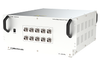
Both IPNetSim™ and IPLinkSim™ applications are available as rackmount appliance with PXN100 and mTOP™ (MT001). mTOP™ solution (MT001), is a 1U rack mount enclosure within which PacketExpert™ 10GX (PXN100) USB units can be stacked to provide high density GigE ports form factor solution for testing GigE switches, routers and network conditions. The multi-device appliance incorporates all the features of a single portable unit along with the necessary PC hardware with Windows® OS and remote accessibility via Ethernet Remote Desktop.

Simply connect PacketExpert™ IPNetSim™ or IPLinkSim™ unit in series with existing optical or electrical links and introduce any impairment type to test the various applications in the lab prior to live deployment.

Both IPNetSim™ and IPLinkSim™ provides several user-defined impairments such as Bandwidth Throttling, Latency, Jitter, Packet Loss, Packet Reordering, Packet Duplication, Packet Corruption, Error Insertion, etc. Bandwidth Throttling simulates slower WAN links like RS232/DSL/Modem/T1/E1/T3/E3 etc. Latency can be used to recreate the constant or varying delay caused by various factors in the network. In addition to the above listed impairment types, IPLinkSim™ can also emulate Congestion in the network by generating additional background traffic.

Both IPNetSim™ and IPLinkSim™ supports Command line Interface (CLI) to access all the functionalities remotely using TCL clients and MAPS™ CLI client/server architecture.

Main Features

  • IPNetSim™ operates in multi-stream mode. Emulates bidirectional multiple WAN Link (16 streams on 1 Gbps ports and 4 streams on 10 Gbps ports) per unit
  • IPLinkSim™ operates in a single stream mode and emulates only 1 bidirectional WAN Link per unit
  • mTOP™ offer rack-mountable, high density, multi-device support. Stack multiple rack units to handle large number of ports. Scalable solution for unlimited number of ports
  • Emulate WAN conditions separately and independently on each direction. Acts as a transparent bidirectional link or a simple Ethernet Bridge for easy integration with any test setup.
  • ”Stream Definition” feature in IPNetSim™
    • classifies traffic on each port into separate streams (up to 16 streams on 1 Gbps ports and 4 streams on 10 Gbps ports); Streams can be defined with various header fields like Source/Destination MAC Address, VLAN Id, MPLS Label, Source/Destination Ipv4 Address, Source/Destination UDP ports
    • Supports both Raw (bit level) and Packet mode (header fields) stream configurations
    • Up to 120 bytes wide stream definitions covering entire packet header from MAC to UDP and also Payload
    • For each stream definition, offset can be set to any byte within the packet (from 0 to 2047) which gives flexibility to define any fields within any protocol headers, and even the payload
    • Independent per stream WAN impairments helps emulate different WAN links in a single device
  • Detailed per stream Tx Rx frames statistics for easy performance monitoring
  • Live throughput graphs per stream to visualize the effects of WAN impairments on the traffic
  • Check the stability or performance of the network with various real-world WAN Impairments including:
    • Bandwidth control option to emulate various WAN link speeds (Modem, DSL, T1/E1/T3/E3/OC3/OC12 etc) – 1 Kbps up to 10 Gbps
    • Latency/Delay (0 milliseconds up to 1.5 seconds per stream (for 1Gbps link)/0.5 seconds per stream (for 10 Gbps link) – single delay, uniform, random distributions) to emulate various wired, wireless, and network elements
    • Packet Loss (loss rate % of total packets 0–100%)
    • Packet Reordering (reordering rate (0-100%) with Delay Range of up to 2 seconds
    • Packet Duplication (percentage of total packets duplicated 0 - 100%)
    • Logic Error Insertion (10^-1 to 10^-9 error rate) within Ethernet packet to emulate faulty network devices or interference
  • Maximum Frame Size supported – 2048 bytes
  • Supports both Periodic (constant and predictable) and Random (unpredictable real-world conditions) impairments such as Packet Loss, Packet Reordering, Packet Duplication, and Error Insertion
  • Supports transmission of Ethernet Pause frame with user-defined quanta used to throttle Ethernet link overload
  • Command Line Interface for automated testing and remote accessibility
Supplier's Site Datasheet

Technical Specifications

  GL Communications, Inc.
Product Category Network Test Equipment
Product Number IPN502 / IPN502p
Product Name IP WAN Emulator (IPNetSim™, IPLinkSim™)
Unlock Full Specs
to access all available technical data

Similar Products

PROFIBUS Diagnostics Suite -  - Softing Inc. Industrial Automation
Softing Inc. Industrial Automation
Specs
Equipment Type Protocol Analyzer
View Details
Network Testers - 4079656 - RS Components, Ltd.
RS Components, Ltd.
Specs
Equipment Type Network tester
Port Type RJ-45; Rj11, rj12, rj45
View Details
Spirent Communications
Specs
Equipment Type Network / LAN Analyzer
Network Protocol 10 Base-T Ethernet; Fast Ethernet
Number of Ports 6
View Details
IEC-61850 Traffic Analyzer - GOOSEMeter One - SMC International
Specs
Equipment Type Network / LAN Analyzer
Network Protocol GOOSE Protocol
Number of Ports 1
View Details